
TEG RepairShop
Software for a computer, phone and Mac repair shop
Run the whole repair shop – check-in, the bench, invoices and payments – from your own website.
$399 a year or $1,995 once, one site. Pro $699 a year or $3,495 once. A free 30-day Pro trial is built in, with no sign-up.
Over 5 years: $1,995 vs RepairDesk Essential $4,740 How does it compare?
What's new – Changed: the Sale button in TEG Companion now asks before it charges.
Try it live Start free trial How does it compare? Save my plan Watch the full video (5 min)
New: the Job screen
One job, every document
The online request, the quote, the work order, the invoice, the payments and the pickup – on one screen, under one job number.
- Request
- Quote
- Work order
- Invoice
- Payments
- Picked up
Stage chips show where the job is, and one button offers the next step – take payment, mark it picked up. Each document stays as it was issued; the Job screen reads them together and opens the right screen when you need to change one.
See it in action
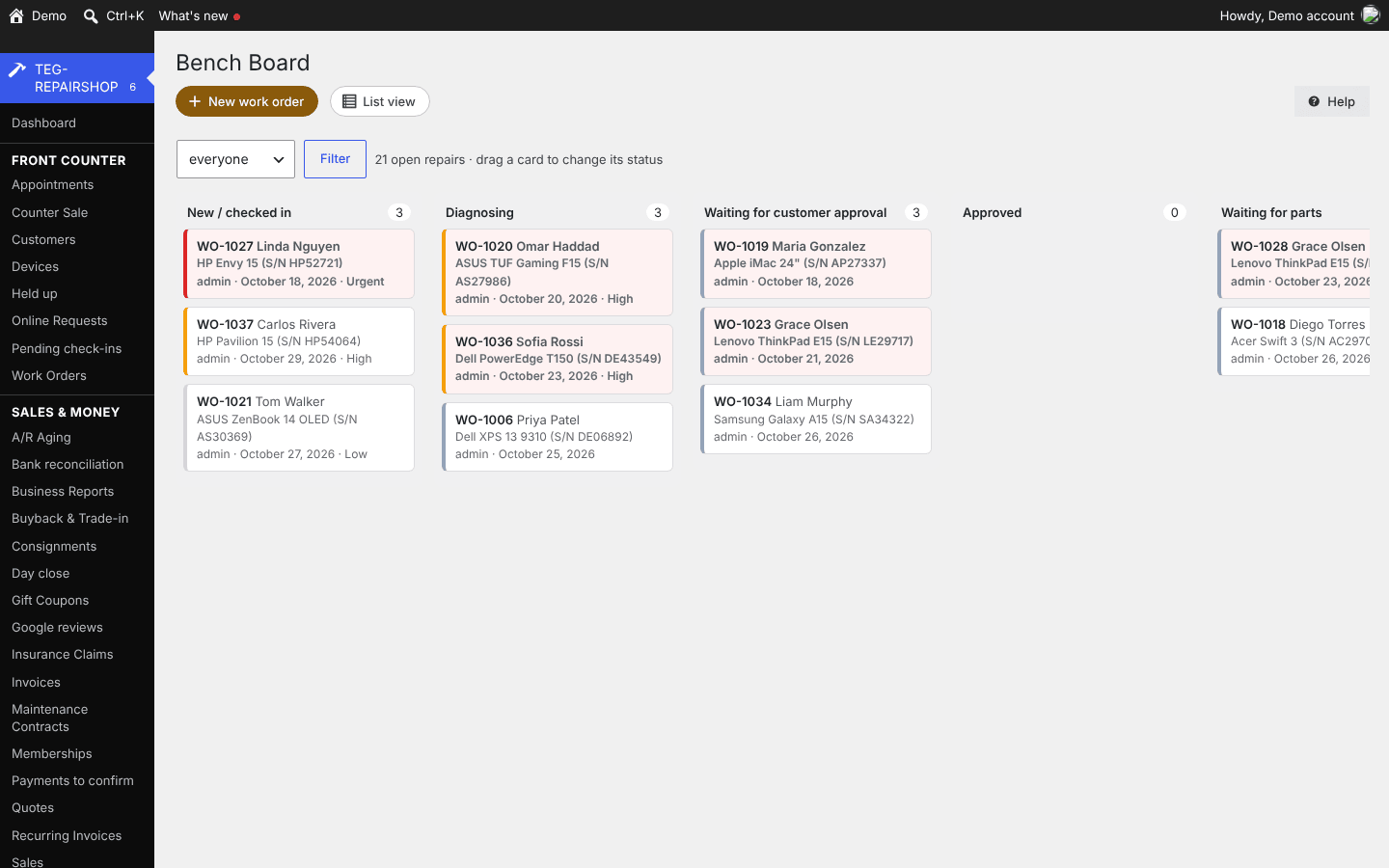
Bench board 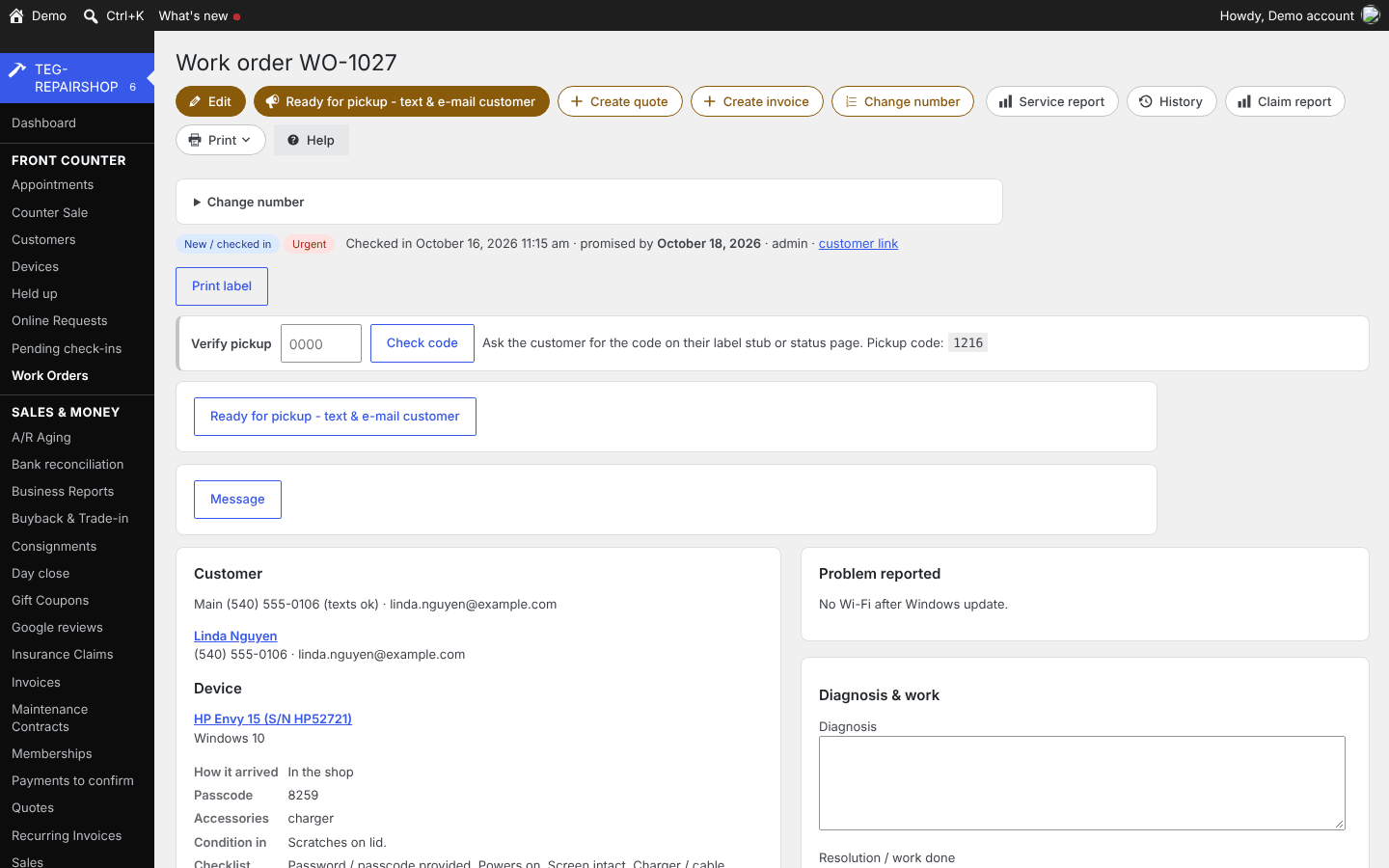
Work order 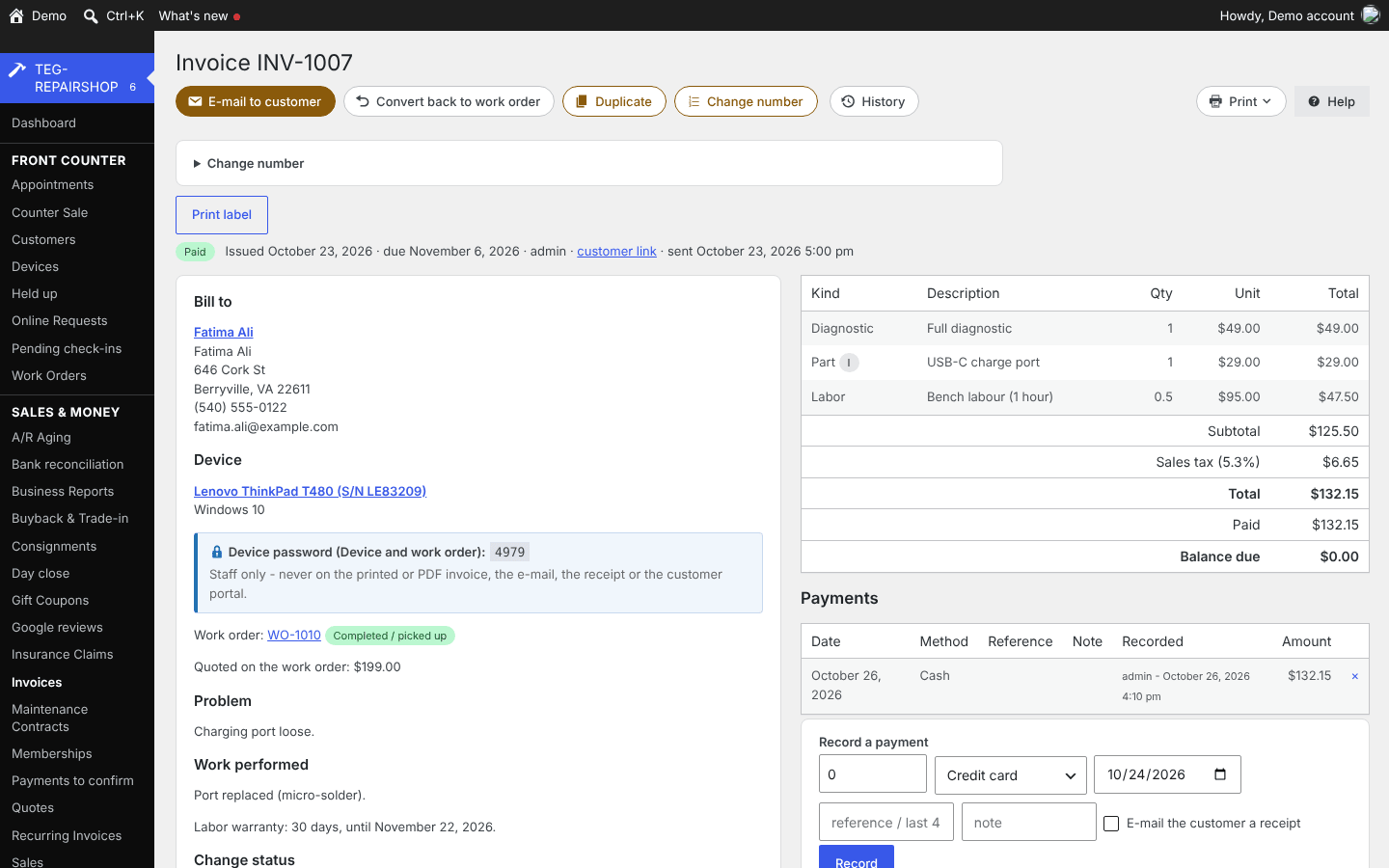
Invoice
What would you save?
Filled in from the comparison sheet: RepairDesk Essential – $79/mo billed yearly x 12 = $948/yr x 5. Prices read on 12 November 2026; type your own bill to see yours.
| Years | What you pay now | TEG, yearly license | TEG, lifetime license | Difference |
|---|---|---|---|---|
| 1 year | $948 | $399 | $1,995 | you keep $549 |
| 3 years | $2,844 | $1,197 | $1,995 | you keep $1,647 |
| 5 years | $4,740 | $1,995 | $1,995 | you keep $2,745 |
TEG has no per-user fee: the license price is the same for one person or fifty. The lifetime license is paid once; the yearly one each year. Card processing, hardware and your hosting are left out on both sides.
What it does
- Your tickets are joined to the Doctor diagnostic tools (sold separately: WinDoctor $199, MacDoctor $179).
- Paperwork in your customer's language, screens in each staff member's own.
- No per-user fee, no per-ticket cap and no monthly bill.
The back office of a computer, phone and Mac repair shop: self check-in at the counter, work orders and the bench board, estimates the customer approves online, invoices and payments, parts, purchasing and supplier price feeds, mail-in shipping labels, house calls, pickups and returns with a live map of the technicians, buyback and trade-in, drop-off partners who take work in and earn a commission, the shop phone, online booking, texting, a customer page they can install on their phone, payroll worked out from the hours and commission already recorded, and the business reports.
Who it is for
Computer, phone and Mac repair shops paying a monthly bill per user and per ticket for software that keeps their customer list on somebody else's server.
Why it beats what you are using now
- It is joined to the Doctor diagnostic tools (sold separately: WinDoctor $199, MacDoctor $179), which no other repair-shop system has: a ticket filed from inside the tool lands in the shop and becomes a work order, the diagnosis you write goes back to the customer inside the tool, and on Pro every report that tool ever ran on the machine is on the device page.
- A week after a repair the shop is told whether it worked: the customer is asked to run the tool again, and the new health score is compared with the one from before the repair. Nobody else can tell you that, because nobody else has the tool.
- No per-user fee, no per-ticket cap and no monthly bill. Unlimited users and unlimited tickets on one license.
- The customer data stays in the shop's own database, on the site you already pay for.
- Card readers at the counter from both Square and Stripe, with Square, Stripe and PayPal online, and payment plans of 2 to 4 payments with no interest and no fees.
- Refer a friend: every customer has a personal code. A friend who gives it at the counter gets money off their first bill straight away, and the customer who sent them is rewarded when that bill is paid. You set both amounts. It is off until you switch it on, and it is in every edition.
- Buyback and trade-in: grade the used device, offer from your own percentages, take the signature, list it for resale in one click.
- A bench page that works offline and syncs when the Wi-Fi comes back, which none of the hosted products offer.
- A customer status page at /status/: the ticket number and the 4-digit pickup code show where the repair is, and once the work is done the service report – what was done, what was tested, what the customer reported – is there too, with the serial numbers kept to staff.
- Your customer's language on everything they receive – quotes, invoices, receipts, texts and the customer pages – while each staff member picks their own screen language. Spanish and French packs download by themselves on Pro, and some Spanish is built into every edition. Customer search forgives typos and takes the words in any order, on the website and in TEG Companion.
- Drop-off partners: the shop two doors down takes work in on a QR card of their own, and earns a percentage of the labor and the parts. Paid on money collected rather than money billed, and a payout is recorded so the same period cannot be paid twice.
- Five years at one shop: $1,995 for a lifetime license, against $4,740 for RepairDesk Essential and $23,220 for Syncro at three technicians.
- Unlimited support by ticket at every price, in-person help if you want it, and a feature request that would help every shop gets built at no charge.
The part no competitor has: the Doctors
Separate products, NOT included in the shop license. Field-diagnostic tools by the same people. Buy only the ones you use, once. Everything else on this page works without owning any of them. Prices are for one technician.
- WinDoctor from $199
- Windows: crashes, failing drives, failed upgrades, dead boot
- MacDoctor from $179
- macOS: beachballs, GPU and power faults, un-bricking
- LinuxDoctor from $99
- Linux desktops and the box under the counter
- ServerDoctor from $149
- Linux and Windows Server, by the calls you actually get
- EmailDoctor from $99
- Mail going to spam: audit, fix, then prove it delivers
All five as the Doctor Bundle: $399 for one technician, again bought separately.
Joined to the shop: a ticket raised in the tool becomes a work order here, every report ever run on a machine sits on its device page by serial, and a re-scan after the repair shows whether the fix held.
New in the Doctors
- A failing drive is now the first thing you see, in WinDoctor, MacDoctor, LinuxDoctor and ServerDoctor: a red warning on the first screen and at the top of the report, and repairs that write to that disk ask first. WinDoctor also tells one stray bad-block entry from a drive that is really failing – or a loose cable.
- WinDoctor: an internet speed test. MacDoctor: the quick check now runs on older Intel Macs too, from Mac OS X 10.6 Snow Leopard to macOS 10.12 Sierra.
- ServerDoctor: on an ISPConfig hosting server, update the plugins of every WordPress site in one run – each as its own web user, the front page checked before and after – with a report that lists the sites with problems first, run by hand or every night.
- The Diagnostic Flowchart, in WinDoctor, MacDoctor, LinuxDoctor and ServerDoctor: tick what the machine is doing, and the tool ranks the likely causes, says which test to run next, runs the safe ones itself and re-ranks.
- A 48-hour look-back by default, so a crash from last month is set aside instead of being diagnosed as today's fault; blue screens read from Windows Error Reporting and heat findings now say what really happened.
- WinDoctor: a PC that switches itself back on after shutdown (a wake source, or a crash on the way out); a site that will not load over HTTPS, told apart between this PC and that server; and a drive that shows a letter but will not open – including the failing USB enclosure that looks exactly like a dead drive.
- WinDoctor 3.158: after Windows is reinstalled over the top, bring the users, their files, the safe app settings, the Wi-Fi networks (the passwords are typed in again) and the software (reinstalled through winget) back from Windows.old – menu M then W. It never deletes Windows.old.
- ServerDoctor: why a website went down – rebooted, restarted, reloaded, overloaded or a CGI storm, with the evidence – and why a mailbox cannot delete or move mail while replying still works. Both read-only, with the fix as text to review.
Manage it from your phone (TEG Companion)
TEG Companion is the staff app on your phone (iPhone or Android) or the counter PC (Windows) that works with your shop's own server – no cloud account in between. Every request runs as the person the phone is paired to, so it can do only what they may do on the website, and one phone can be paired with several TEG shops and switch between them. It is included with the shop license. Its reports go back up to twelve months, and in most shops a quote, invoice or order opened on the phone shows exactly the copy the customer gets. With the shop on the Pro edition, each phone can show the app in Spanish or French – on Android and Windows today, not on iPhone yet.
What it does with TEG RepairShop:
- Check-in on the phone or the counter PC: the customer, the device with its history, the serial or IMEI scanned or read from a photo of the label, intake photos, the passcode, the terms and the customer's signature, an optional deposit (or a deposit link by text), and a warning when the device is back inside an earlier repair's warranty.
- Work orders found by number, label scan or serial: notes typed or dictated, status (one-tap messages to the customer from the phone), parts, the labor timer, "Need a part" onto the supplier's purchase order, a Doctor test asked of the WinDoctor stick with the report filed back, and the pickup code checked before the device is handed over.
- Invoices and estimates: lines from the catalog with sale prices, coupons applied or scanned, payments by cash, check, Zelle or a card in Square (Android), partial payments and deposits, quotes texted for approval and signed on the customer's phone.
- The customer: details, the timeline of everything that happened with them, their club, Fleet health for managed clients, and unclaimed computer check-up reports from WinDoctor and MacDoctor; the service report on the phone and printed on the shop's own printers through PrintNode; appointments booked with reminders.
- Today: check-ins, pickups, money in by method, new leads and anything to check, plus the read-only Day close. Works with no signal: check-ins, notes, payments and parts wait in an outbox and are sent in order when the connection returns, never twice.
Try it on this demo: install TEG Companion, open Manage shops > Demo shops and choose TEG RepairShop. Your phone gets a demo sign-in of its own for this shop – no password to type – with the sample data on it, and the pairing ends by itself after seven days. Nothing you do there reaches a real person.
Opens TEG Companion in a new tab, already connected to this demo shop. Nothing to install. Sample data, rebuilt every night.
Scan to get the real app on your phone.
iPhone: on the App Store. The download page always carries the latest version for Android and Windows.
Download on theApp StoreDownload forAndroidDownload forWindows
TEG Rover: the house-call phone app Add-on
For technicians who go out to the customer: on-site repairs, installs and pickups. In use now: on iPhone from the App Store, and on Android (Android 7 or newer) downloaded straight to the phone, paired with the shop by a QR code. The Android download page always carries the latest version. A paid add-on: one phone is included with Pro and each extra phone is $99 a year; with Standard, $99 a year per phone. Until the add-on license is on sale it runs on the shop's own license.
Download on theApp StoreDownload forAndroid
- The shop schedules house calls with a priority (urgent, high, normal, low) and a checklist set per visit type.
- An on-call technician sees the board of open calls and claims one – two technicians can never take the same call.
- Navigate hands off to Waze, Google Maps or Apple Maps – each person picks their own – with the in-app map as a preview; near the address the phone offers to mark the arrival (a 150 m zone), even while the other maps app is on screen.
- Every checklist item must be ticked before the visit can be completed; the completion is uploaded and closes the call.
- The dispatcher sees each technician's last check-in and which one is closest. GPS check-ins every 5-10 minutes, and ONLY while the technician is on shift.
- No signal at the address? The finished visit waits on the phone and is sent when the signal returns.
- Today's route: the day's stops in driving order with Navigate, Call, Running late, Arrived and Done; an "On my way" text with the arrival time, sent from the phone's own texting app; "Arrived" and "Leaving" record the time on site against a leave checklist; the customer signs at the door.
- A mileage log, if the shop keeps one: the day's miles worked out from the stops (or counted from GPS while on shift), logged at End shift and listed per technician under Business Reports > Mileage log.
- From the same phone: print the job's label or documents on the shop's own printers through PrintNode, show a customer the Adoption corner, and renew a customer's club at the club's yearly price with the payment.
- Joined to the Doctor tools: a WinDoctor or MacDoctor report can become the job ticket for the visit.
- Pickups and returns as well as house calls: collect a device for the bench, or bring the repaired one back with the customer's signature and the balance taken at the door – by cash, check, a card in Square on the same phone (checked with Square before it touches the invoice), or Zelle, Venmo or PayPal, which wait for the office to confirm them.
- The shop side is in TEG RepairShop now: House Calls with the dispatch board, a live map of the on-shift technicians, each technician's route for the day, what each job pays the technician, and a "probably on site" hint when a technician navigating with Waze or Google Maps is at the address but has not pressed Arrived.
The big field-service apps have GPS and checklists too. The difference: one flat yearly price per phone rather than a monthly fee per technician, the data stays on your own site, each phone pairs by scanning a QR code with its own key you can revoke – no passwords – and location is shared only on shift.
In English, Spanish and French
Every TEG shop, and the TEG Companion and TEG Rover apps, run in English, Spanish and French. The language is a download inside the shop – Settings > Language, no reinstall – and the language packs need the Pro edition (the Language screen is there in every edition). Quotes, invoices, receipts, e-mails, texts and the customer pages follow the shop's language, whoever clicks the button, and each staff member can pick their own screen language. The phone apps: on Android and Windows now.
Need a language we do not list yet? Ask – we add it free for Pro and lifetime licenses.
Books, payroll and taxes: TEG Back Office, the Pro add-on – see it
New in 1.89-1.99: TEG Companion's Sale button – a quick sale on the phone: scan a barcode or search parts and services, leave it walk-in or type the customer's name and e-mail (a returning customer is found, a new one is added, the receipt goes to that address, and the newsletter box is offered when your newsletter is on), and nothing is charged until you confirm the total. Delete for a mistaken or duplicate invoice or work order, in TEG Companion too, only with the "Delete records" permission and never on an invoice that took a payment; deleting the newest one gives its number back when nothing newer used it. A work order whose deposits pay its quote in full becomes its invoice by itself and shows Paid. Voiding an invoice gives back the store credit used on it, once. Reopen as unpaid, for a closed invoice whose payment was never really made, and Paid already, for money that came in but was never written down. The referral offer: a customer's code works like a coupon – money off a new customer's first bill and a reward for the customer who sent them once that bill is paid, first bill only, nobody referring themselves. "Charge was made" for a Square charge the phone never heard back about, counted only when a manager confirms it. Every work order says where the unit is – one of your shops, a drop-off partner, with the customer or an outside place – with the status "Customer has unit – considering quote". Card holds released when the customer arrives, and a no-show fee charged only when you tick the box. Website shortcodes for your hours, the price list, the newest Adoption corner items and reviews; "Get support" on every screen; and TEG Companion search that finds a customer by a line on their invoice. New in 1.84-1.88: Settings > Language – everything a customer receives in the customer's language, else the shop's, while each staff member picks their own screen language; Spanish and French packs download by themselves on Pro, and the Spanish built into RepairShop keeps working in every edition. Dates on documents follow your region (11/13/2026 3:05 pm in the United States, 13/11/2026 15:05 in the United Kingdom). Customer search forgives typos and takes the words in any order, on the website and in TEG Companion. In TEG Companion: a job marked Job complete or Picked up in one or two taps, with nothing sent to the customer, and reports for this month and up to 12 months back, with sales tax and the invoices behind each figure. TEG Companion and TEG Rover follow a language per phone on Pro (Android and Windows now, not on iPhone yet). New: attach documents to a work order or an invoice – a PDF, a picture, a text or CSV file, Word, Excel or OpenDocument, up to 5 MB each – from the Documents card. New: the service report prints on the shop's own document printer through PrintNode, from TEG Companion or the work order, as the staff copy (with serials) or the customer copy. New: a service report on every job – the work performed, the diagnostics run and the symptoms the customer reported – as a PDF, by e-mail, on the customer's status page and attached to the invoice, with serial numbers kept to staff; and labels that print legibly on Leitz and thermal printers. New: a customer status page at /status/ that needs only the ticket number and the 4-digit pickup code; a device that comes back within 30 days flagged as a return, with a Returns report; "Ready for pickup – text & e-mail customer" as one button that sends the pickup code and the status link; QR check-in that asks the damage question first, with required fields, every QR code in one place under Setup > QR Codes and your own image in the center; a quote that becomes a work order, an invoice that can go back to a work order, and one job keeping one number; deposits held on the work order rather than on an invoice; self check-in that finds a returning customer instead of making a duplicate, with several devices on one check-in; the device password on staff invoices and Edit first on work orders; the Doctor report viewer in TEG Companion, a lead answered by text and checked in straight from the lead; Get my license by order number and 5-site licenses; appointments booked from TEG Companion, with reminders and alarms that keep their time across daylight saving; and a "Set up your shop" chapter in the Help Center. New: the Adoption corner – put a used, refurbished or abandoned device up for sale on eBay (fixed price or auction, with eBay's price guide and sold orders read back) or Etsy straight from the shop, or fill Facebook Marketplace, Craigslist and Nextdoor with the TEG Lister browser extension, plus an optional public page, a newsletter block and Google Merchant and Meta catalog feeds (all off until you turn them on); sales that apply by themselves and coupons, with an offer printed on every paid receipt; clubs renewed for a year with the payment, from the office or the phone; a deposit asked at check-in and sent as a pay link by text; a warning when a device comes back inside an earlier repair's warranty; review requests only after pickup and full payment, rate-limited; quotes approved and signed from a text; "Need a part" from the work order onto the supplier's purchase order; Doctor test requests answered by a paired WinDoctor stick; the day close (the drawer, card against Square, Zelle alerts matched); the customer timeline; Fleet health for managed clients with a monthly PDF; and Google Local Services leads in Online Requests with a leads-this-month count, beside Yelp quote requests and the service-request QR codes. Since: pickup codes, incoming Zelle payments matched to the invoice, bank reconciliation, nightly backups with an off-site copy to Wasabi, Amazon S3 or SFTP, TEG Rover's on-site visits, door signatures, "On my way" texts and mileage log, the Today summary, A/R aging and statements, and a built-in Help Center. Nothing in any of it e-mails or texts a customer by itself unless you switch it on. Earlier: invoices, work orders and device labels printed through PrintNode at the size of your labels (Leitz, Brother, Dymo or your own), Setup > Move to another site in one checked file, and a staff-only Private note on an invoice.
Try it with your own data
Upload a CSV of your customers and their devices – an export from the program you use now (RepairShopr, RepairDesk, Jobber or a spreadsheet) – and see them inside the demo. Only you see them, and they are deleted after 24 hours.
What your customer sees
Your shop screen and your customer's page side by side, in a sandbox of your own: book as the customer, move the job on as the shop, text a pay link and pay it with a test card. Nothing is charged and nothing is sent.
See a computer check-up report arrive
Plug the WinDoctor stick into a customer's PC and the checkup lands on the work order by itself: the health score, what was found, and a summary your customer can read. Try it on a sample PC – in a sandbox of your own, nothing is sent.
How it compares
The five systems below are the ones a computer, phone or Mac repair shop is most likely renting today. This is the whole sheet, priced at one shop, feature for feature.
At a glance
TEG RepairShop beside RepairDesk, RepairShopr, RepairQ on the seven questions people ask first. Under every figure is where it comes from and when it was checked; "not published" means we did not find it on the vendor's own pages – it is not a No.
| Question | TEG RepairShop | RepairDesk | RepairShopr | RepairQ |
|---|---|---|---|---|
| Monthly price (lowest public plan) | No monthly plan: $399 a year or $1,995 once | $99/mo, or $79/mo billed yearly (Essential)source, 12 Nov 2026 | $69.99-$149.99/mo; $129.99/mo billed yearly for one shopsource, 12 Nov 2026 | $20/mo Starter (1 user); $90/mo Essentialsource, 12 Nov 2026 |
| Per-user fees | None: one license per site, unlimited users | 5 users on Essential, 8 on Growthsource, 12 Nov 2026 | 1 user on Starter, 10 abovesource, 12 Nov 2026 | 5 on Essential, +$5/user; 10 abovesource, 12 Nov 2026 |
| Who holds your data | You: in your own WordPress database | Vendor (their cloud)source, 12 Oct 2026 | Vendor (their cloud)source, 12 Oct 2026 | Vendor (their cloud)source, 23 Sep 2026 |
| Works offline / self-hosted | Self-hosted on your WordPress; the bench page and TEG Companion keep working offline and sync later | iPad POS offline mode (cash only, last 30 tickets); not self-hostedsource, 12 Oct 2026 | Offline use not published; not self-hostedsource, 12 Oct 2026 | No offline bench; not self-hostedsource, 23 Sep 2026 |
| Phone app | TEG Companion staff app (iPhone on the App Store, Android, Windows), included | iOS/Android app + iPad POSsource, 12 Oct 2026 | iOS/Android appssource, 12 Oct 2026 | not publishedsource, 12 Oct 2026 |
| Card payments | Yes: Square and Stripe card readers at the counter; Square, Stripe and PayPal online | Yes: Square Terminalsource, 12 Oct 2026 | Partial: Stripe, PayPal, Authorize.netsource, 12 Oct 2026 | Yes: card reader at the countersource, 23 Sep 2026 |
| Free trial | 30 days, built in, no sign-up | not publishedsource, 12 Oct 2026 | not publishedsource, 12 Oct 2026 | not publishedsource, 23 Sep 2026 |
Where a cell says "better than us", it is. Prices change: ask a vendor to confirm their figure before you decide anything on it.
The vendors' own published list prices, read on 12 November 2026. Ask a vendor to confirm their figure before you decide anything on it.
The rows where a competitor matches us, or does it better, are left in. A comparison written only to flatter the seller is worth nothing to the person buying.
What would it cost you?
Pick what you use now, or type what you pay. Every competitor price below is the one on their own pricing page, with the date we read it.
| 1 year | 3 years | |
|---|---|---|
| What you pay now | $1,188 | $3,564 |
| TEG RepairShop, paid yearly (founding offer: first year at half price) | $199.50 you save $988.50 | $997.50 you save $2,566.50 |
| TEG RepairShop, lifetime license | $1,995 TEG costs $807 more | $1,995 you save $1,569 |
- RepairDesk: $99/mo, or $79/mo billed yearly (Essential) – source, read 12 Nov 2026
- RepairShopr: $69.99-$149.99/mo; $129.99/mo billed yearly for one shop – source, read 12 Nov 2026
- RepairQ: $20/mo Starter (1 user); $90/mo Essential – source, read 12 Nov 2026
Our prices are our own published ones, per site, with no per-user fee. A competitor's first listed monthly price is used; their yearly discounts, add-ons and payment fees are not in it, and prices change – check their page.
Switching to TEG RepairShop
Switching from RepairDesk, RepairShopr, RepairQ, Fixably or MyRepairApp? Pick the program you use now to see how your records come across.
From RepairDesk
Ready preset The CSV import has a ready column preset for RepairDesk's export: its columns are matched for you.
It brings in your customers: Id in your old system, First name, Last name, E-mail, Phone, Mobile, Address, ZIP / postcode, City, State / province, Country, Company.
To get the file: Customer > Manage Customer > Import/Export > Export.
Built in: Settings > Import takes customers, devices, work orders, invoices with their payments, and the parts and services list from CSV files – it reads RepairShopr, RepairDesk and mHelpDesk exports – and Setup > Move to another site brings a whole shop across in one file.
From RepairShopr
Ready preset The CSV import has a ready column preset for RepairShopr's export: its columns are matched for you.
It brings in your customers: Id in your old system, Company, First name, Last name, E-mail, Phone.
To get the file: Admin > Reports > Customer Export (customers_dump_<date>.csv).
Built in: Settings > Import takes customers, devices, work orders, invoices with their payments, and the parts and services list from CSV files – it reads RepairShopr, RepairDesk and mHelpDesk exports – and Setup > Move to another site brings a whole shop across in one file.
From RepairQ
There is no ready column preset for RepairQ's export. The CSV import lets you match each column by hand and do test runs before anything is saved.
From Fixably
There is no ready column preset for Fixably's export. The CSV import lets you match each column by hand and do test runs before anything is saved.
From MyRepairApp
There is no ready column preset for MyRepairApp's export. The CSV import lets you match each column by hand and do test runs before anything is saved.
Rather have it done for you? If you keep your customers or your stock in a spreadsheet, we bring them in. Then we walk your staff through it. Moving your records over
Your next step
Which plan fits me?
Save my plan tick what you need, see the price, keep a copy
See it on the phone
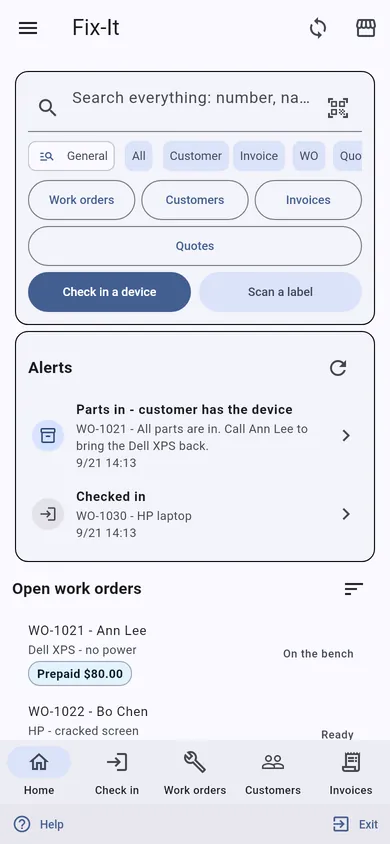
TEG Companion is the staff app that comes with the license. These are its real screens, not mock-ups.
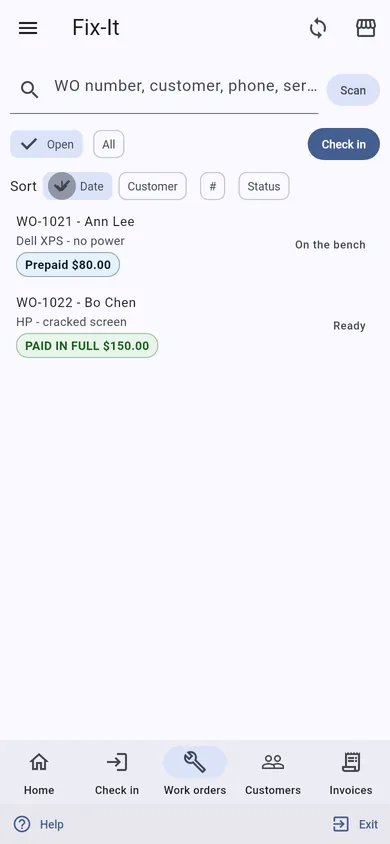
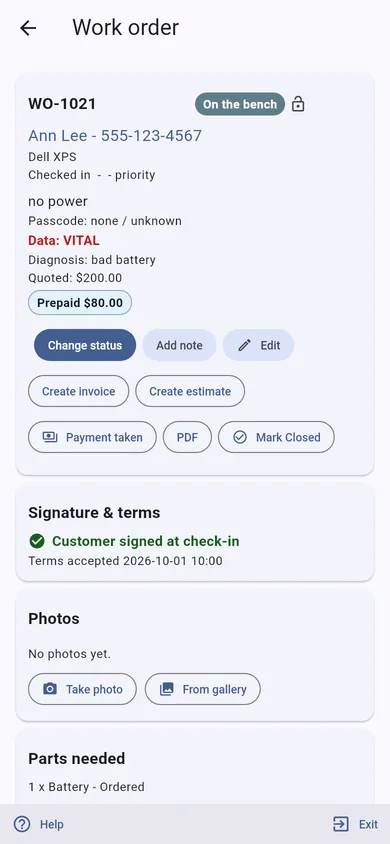
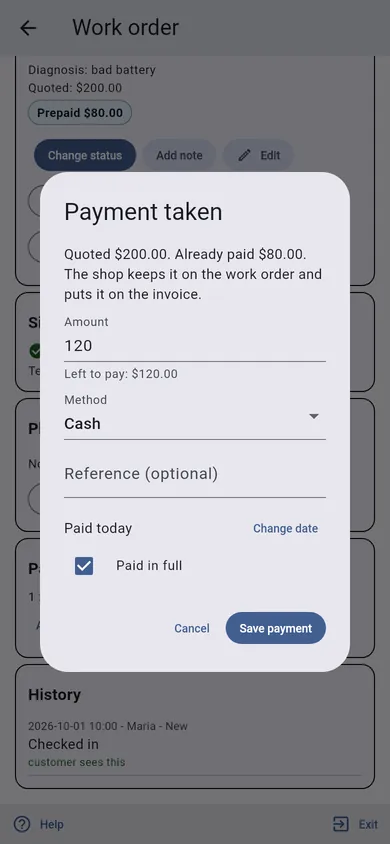
- No lock-in. It is a WordPress plugin on your own website. Your data stays in your own database, with you.
- Pay yearly or once. A lifetime license is $1,995, one time – or pay yearly if you prefer.
- Your data, out whenever you want. Nightly backups with an off-site copy to Wasabi, Amazon S3 or SFTP, "Move to another site" in one checked file, and CSV exports of work orders, invoices and parts.
- Your data stays on your server – we cannot see it. The only call home is the license check, and it sends no customer, job or sale.
Built and used every day at TopTech Computers
Built and run in a real repair shop: TEG RepairShop runs the counter and the bench at TopTech Computers in Alexandria, Virginia, every working day.
Your data stays on your server – we cannot see it. Everything lives in your own WordPress database. The only call home is the license check, and it sends no customer, job or sale. What exactly it sends
Get the comparison sheet and setup checklist
The sheet sets this software beside what you pay for now, row by row; the checklist is every step from install to your first day on it. The links show here as soon as you press the button. Nothing here is needed to try the demo.
Questions
What does TEG RepairShop cost?
$399 a year or $1,995 once, one site. Pro $699 a year or $3,495 once. A free 30-day Pro trial is built in, with no sign-up. One site, no per-user fee, and support by ticket included.
Can I try it before I buy?
Yes, twice over: the live demo on this site, with sample data and no sign-up, and a free 30-day trial of the full Pro edition on your own website, with no card.
What happens when the trial ends?
Nothing is deleted and nothing is charged – there is no card on file. Without a license the shop pauses (you can still see your records, but not add to them) until you enter a license code; then you carry on with the same records.
Can I bring my records over?
Built in: Settings > Import takes customers, devices, work orders, invoices with their payments, and the parts and services list from CSV files – it reads RepairShopr, RepairDesk and mHelpDesk exports – and Setup > Move to another site brings a whole shop across in one file.
How do I get my data out?
Nightly backups with an off-site copy to Wasabi, Amazon S3 or SFTP, "Move to another site" in one checked file, and CSV exports of work orders, invoices and parts.
Is there a phone app?
TEG Companion, the staff app for an iPhone, an Android phone or the counter PC (Windows), comes with the license and talks only to your own site. The iPhone app is on the App Store. TEG Rover, the app for work away from the shop, works with this shop too, on iPhone from the App Store and on Android. One phone is included with Pro; each extra phone is $99 a year. With Standard, $99 a year per phone.
Does it work in Spanish?
Yes, with the Pro edition: Spanish and French language packs download by themselves and put the shop's customer paperwork, e-mails, texts and customer pages in that language; each staff member picks their own screen language, and on Android and Windows the phone apps follow each phone's language. Without Pro everything stays in English.
Does it do the books, payroll and taxes?
Yes, with TEG Back Office, included with Pro: payroll, bills and expenses, the sales tax return, 1099s and your books in GnuCash, QuickBooks or Xero. Everything it does is on the TEG Back Office page. From this shop it reads the staff, the hours from its time clock and each person's commission.
Where is my data kept?
In your own WordPress database, on your own hosting. Your data stays on your server – we cannot see it. There is no account with us that holds your customers, and no copy on our machines. (If you choose to have us host the site for you, it is on a server we look after, and we say so up front.)
Does the plugin send anything to you?
Only the license check and the list of language packs. For a paid license it asks our license server about once a day whether the license is still good, and it sends exactly this: which plugin and version, your site's domain name, a random install number made on your site, and your license code or a short fingerprint of it. It never sends a customer, a job, a sale or anything you typed. If our server cannot be reached the software keeps working. Twice a day the shop also reads the public list of language packs, and with Pro it downloads the packs it needs – that request carries no site address and nothing about your shop.
Who can see my records?
The people you give a WordPress account, with what you let them do. The phone apps talk only to your own site and do only what the person they are paired to may do there.
Open the live demoDownload & tryPrintable one-pager (PDF)Every trade