
TEG-MARKETER
Send e-mail campaigns from your own website, with no charge per contact.
$299/yr or $1,495 once. Pro, with AI copywriting and language packs: $499/yr or $2,495 once. No per-contact charge, and a free 30-day Pro trial is built in.
Over 5 years: $1,495 vs Mailchimp (Standard) about $9,000 How does it compare?
Founding customers: first year at half price – apply
Sample data, rebuilt every night. Nothing here reaches a real person.
The shop's public page. No password needed.
The screens the shop works on all day. Signs you in with the demo account.
Try it with your own data
Upload a CSV of your customers – an export from the program you use now (RepairShopr, RepairDesk, Jobber or a spreadsheet) – and see them inside the demo. Only you see them, and they are deleted after 24 hours.
Your next step
See it on the phone
TEG Companion is the staff app that comes with the license. These are its real screens, not mock-ups.
These are TEG Companion's shared shop screens, shown with a sample booking. On your phone they show your own customers and work, in your trade's own words.
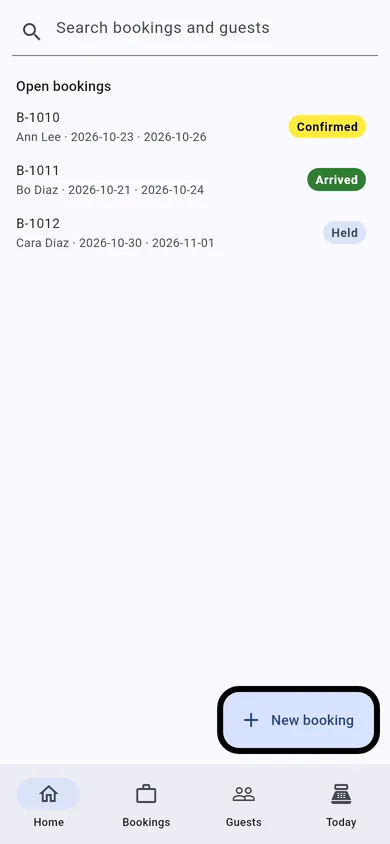
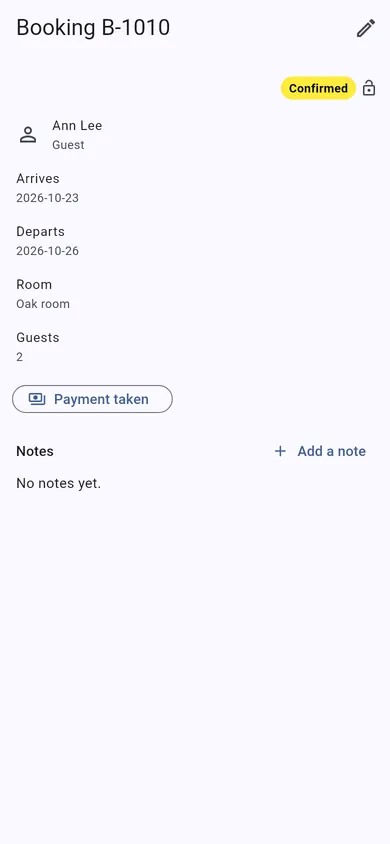
Manage it from your phone (TEG Companion)
TEG Companion is the staff app on your phone (iPhone or Android) or the counter PC (Windows) that works with your shop's own server – no cloud account in between. Every request runs as the person the phone is paired to, so it can do only what they may do on the website, and one phone can be paired with several TEG shops and switch between them. It is included with the shop license. Its reports go back up to twelve months, and in most shops a quote, invoice or order opened on the phone shows exactly the copy the customer gets. With the shop on the Pro edition, each phone can show the app in Spanish or French – on Android and Windows today, not on iPhone yet.
What it does with TEG-MARKETER:
- Contacts a page at a time – search, details, notes and a quick add – never the whole list copied to the phone.
- Campaigns to look at, paused and resumed from the phone (they are written and sent on the website), and the stats card for the last 30 days.
Try it on this demo: install TEG Companion, open Manage shops > Demo shops and choose TEG-MARKETER. Your phone gets a demo sign-in of its own for this shop – no password to type – with the sample data on it, and the pairing ends by itself after seven days. Nothing you do there reaches a real person.
Opens TEG Companion in a new tab, already connected to this demo shop. Nothing to install. Sample data, rebuilt every night.
Scan to get the real app on your phone.
iPhone: on the App Store. The download page always carries the latest version for Android and Windows.
Download on theApp StoreDownload forAndroidDownload forWindows
Books, payroll and taxes: TEG Back Office, the Pro add-on – see it
In the TEG Companion app: Manage shops > Demo shops pairs any of these at once.
- No lock-in. It is a WordPress plugin on your own website. Your data stays in your own database, with you.
- Pay yearly or once. A lifetime license is $1,495, one time – or pay yearly if you prefer.
- Your data, out whenever you want. Your contact list exports as a CSV file at any time, and it never leaves your server to be stored somewhere else.
- Your data stays on your server – we cannot see it. The only call home is the license check, and it sends no customer, job or sale.
Built by people who run a shop: TEG-REPAIRSHOP, the first of the family, is built and run in a real repair shop – TopTech Computers in Alexandria, Virginia.
How does it compare?Back to the overview
Quick WordPress intro
The sign-in page. WordPress has a sign-in page of its own. The back-office button signs you in for you, so you may never see it.
The admin page. You land on a WordPress admin page. Every shop in this family runs inside WordPress, so this is the back office.
The left menu. Everything is in the menu on the left. The shop's own screens are under its name – TEG-YOURSHOP – near the top. On this demo that is TEG-MARKETER.
The black bar. The black bar across the top is WordPress's own. To get back to the demo page, use the "Back to the demo page" link in the note at the top of the screen, or your browser's Back button.
You cannot break it. The demo account can open every screen. It cannot break anything, and everything is rebuilt from sample data every night.
Before you go in
- No charge per contact: the list can grow without the bill growing.
- Segments from what people bought and whether they open.
- Your customer list stays on your own server.
The demo account opens every screen of the shop, its Setup and Settings included, and can change them – everything is put back at midnight. It cannot change its own password, touch another user, install anything or alter WordPress itself; keys and passwords stay hidden, and nothing is sent outside the demo or charged.
AI copywriting with your own Anthropic key
What it does: Claude, the AI made by Anthropic, writes your subject lines, opening lines or whole e-mails in your brand voice from each customer's purchase history, and turns a plain-English description ("customers who spent over $200 and have not been back in 60 days") into an audience you check before sending. If the AI is ever unavailable, the e-mail simply goes out as you wrote it.
- You bring your own key: TEG-MARKETER contains no key and never uses anyone else's.
- No markup: you pay Anthropic directly, at Anthropic's published price, on your own Anthropic account.
- You can cap the spend: set a monthly limit in the Anthropic console and the bill can never surprise you.
- Typical cost with the default model (Claude Haiku 5.5, $0.10 per million input tokens and $0.50 per million output tokens on Anthropic's price list, October 2026): well under one US cent to write a campaign e-mail; roughly $2 to $4 per 1,000 e-mails when Claude writes each one personally.
- Private by design: the key stays on your server – masked on screen, never sent to the phone app or put in an export – and only first names and purchase facts go to Anthropic, never an e-mail address.
How to get a key
- Create an account at console.anthropic.com (Anthropic's developer console – separate from a Claude.ai chat subscription).
- Add billing: Settings > Billing, then buy prepaid credits or add a card. A few dollars lasts most shops months.
- Settings > API keys > Create key. Name it e.g. "TEG-MARKETER – my shop".
- Copy the key (it starts sk-ant- and Anthropic shows it only once) and paste it into TEG-MARKETER, Settings > AI copywriting. Save, then press "Test the key".
- Set a monthly spend limit in the Anthropic console (Settings > Limits).
On this demo AI copywriting is not connected: there is no key, nothing is sent to Anthropic, and the AI buttons in the back office explain this instead – so no visitor can spend anybody's money. Everything else works with the sample coffee shop.