
TEG-REPAIRSHOP
Run the whole repair shop – check-in, the bench, invoices and payments – from your own website.
$399 a year or $1,995 once, one site. Pro $699 a year or $3,495 once. A free 30-day Pro trial is built in, with no sign-up.
Over 5 years: $1,995 vs RepairDesk Essential $4,740 How does it compare?
Founding customers: first year at half price – apply
Sample data, rebuilt every night. Nothing here reaches a real person.
The shop's public page. No password needed.
The screens the shop works on all day. Signs you in with the demo account.
Get your own demo shop
Want to try TEG-REPAIRSHOP on your own, with nobody else clicking around? Get a private demo shop, just for you. It opens already signed in.
- It is your own copy of TEG-REPAIRSHOP, with sample customers and repairs already in it.
- Nobody else can see it or change it.
- It lasts 72 hours. Then it is deleted.
- Nothing leaves the shop. It sends no real e-mails or texts and takes no real payments.
- One per browser. Come back to this page in the same browser to open it again.
New: the Job screen
One job, every document
The online request, the quote, the work order, the invoice, the payments and the pickup – on one screen, under one job number.
- Request
- Quote
- Work order
- Invoice
- Payments
- Picked up
Stage chips show where the job is, and one button offers the next step – take payment, mark it picked up. Each document stays as it was issued; the Job screen reads them together and opens the right screen when you need to change one.
See a computer check-up report arrive
Plug the WinDoctor stick into a customer's PC and the checkup lands on the work order by itself: the health score, what was found, and a summary your customer can read. Try it on a sample PC – in a sandbox of your own, nothing is sent.
Try it with your own data
Upload a CSV of your customers and their devices – an export from the program you use now (RepairShopr, RepairDesk, Jobber or a spreadsheet) – and see them inside the demo. Only you see them, and they are deleted after 24 hours.
Your next step
See it on the phone
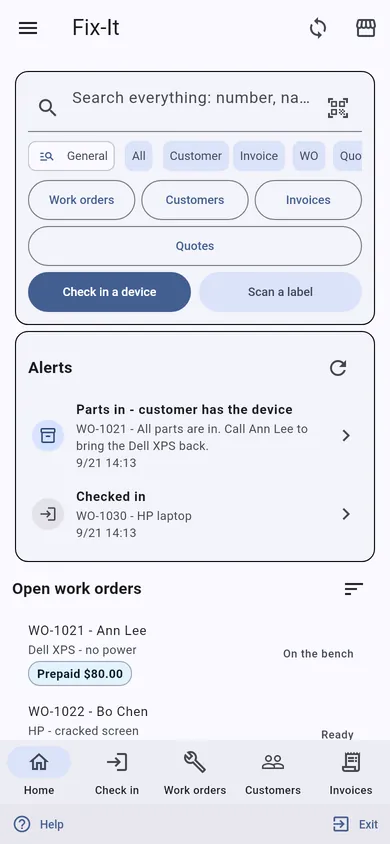
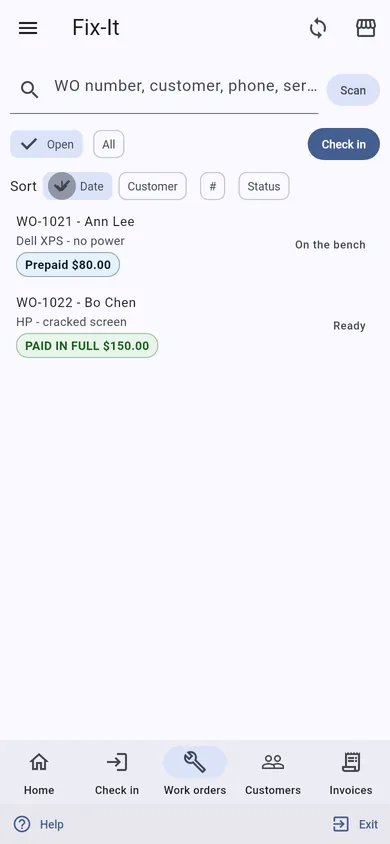
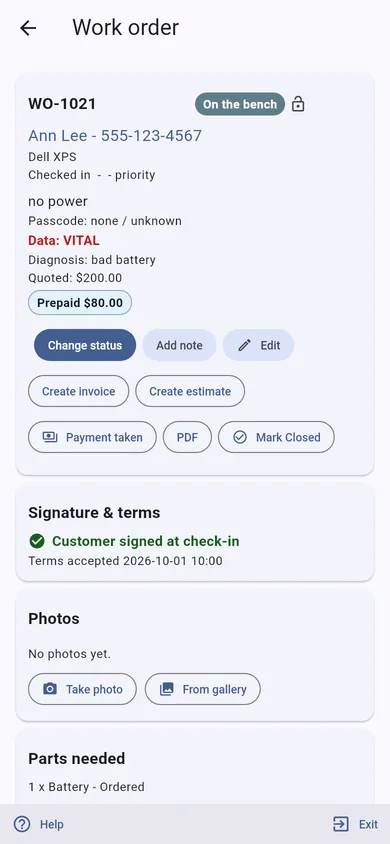
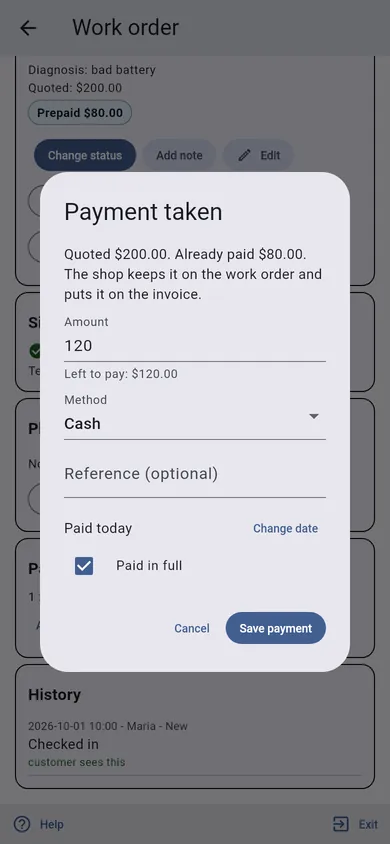
TEG Companion is the staff app that comes with the license. These are its real screens, not mock-ups.
Try TEG Companion on your phone with this demo shop
- The app asks before it pairs. Nothing happens until you say yes.
- It is sample data, rebuilt every night.
- Nothing is sent or printed from the demo shop. No e-mails, no texts, no receipts.
- The pairing lasts 7 days. Then the demo shop forgets your phone.
- You can end it sooner: Settings in the app has Forget this shop.
No app yet? Get Companion · Get Rover
Manage it from your phone (TEG Companion)
TEG Companion is the staff app on your phone (iPhone or Android) or the counter PC (Windows) that works with your shop's own server – no cloud account in between. Every request runs as the person the phone is paired to, so it can do only what they may do on the website, and one phone can be paired with several TEG shops and switch between them. It is included with the shop license. Its reports go back up to twelve months, and in most shops a quote, invoice or order opened on the phone shows exactly the copy the customer gets. With the shop on the Pro edition, each phone can show the app in Spanish or French – on Android and Windows today, not on iPhone yet.
What it does with TEG-REPAIRSHOP:
- Check-in on the phone or the counter PC: the customer, the device with its history, the serial or IMEI scanned or read from a photo of the label, intake photos, the passcode, the terms and the customer's signature, an optional deposit (or a deposit link by text), and a warning when the device is back inside an earlier repair's warranty.
- Work orders found by number, label scan or serial: notes typed or dictated, status (one-tap messages to the customer from the phone), parts, the labor timer, "Need a part" onto the supplier's purchase order, a Doctor test asked of the WinDoctor stick with the report filed back, and the pickup code checked before the device is handed over.
- Invoices and estimates: lines from the catalog with sale prices, coupons applied or scanned, payments by cash, check, Zelle or a card in Square (Android), partial payments and deposits, quotes texted for approval and signed on the customer's phone.
- The customer: details, the timeline of everything that happened with them, their club, Fleet health for managed clients, and unclaimed computer check-up reports from WinDoctor and MacDoctor; the service report on the phone and printed on the shop's own printers through PrintNode; appointments booked with reminders.
- Today: check-ins, pickups, money in by method, new leads and anything to check, plus the read-only Day close. Works with no signal: check-ins, notes, payments and parts wait in an outbox and are sent in order when the connection returns, never twice.
Try it on this demo: install TEG Companion, open Manage shops > Demo shops and choose TEG-REPAIRSHOP. Your phone gets a demo sign-in of its own for this shop – no password to type – with the sample data on it, and the pairing ends by itself after seven days. Nothing you do there reaches a real person.
Opens TEG Companion in a new tab, already connected to this demo shop. Nothing to install. Sample data, rebuilt every night.
Scan to get the real app on your phone.
iPhone: on the App Store. The download page always carries the latest version for Android and Windows.
Download on theApp StoreDownload forAndroidDownload forWindows
Books, payroll and taxes: TEG Back Office, the Pro add-on – see it
In the TEG Companion app: Manage shops > Demo shops pairs any of these at once.
- No lock-in. It is a WordPress plugin on your own website. Your data stays in your own database, with you.
- Pay yearly or once. A lifetime license is $1,995, one time – or pay yearly if you prefer.
- Your data, out whenever you want. Nightly backups with an off-site copy to Wasabi, Amazon S3 or SFTP, "Move to another site" in one checked file, and CSV exports of work orders, invoices and parts.
- Your data stays on your server – we cannot see it. The only call home is the license check, and it sends no customer, job or sale.
Built and used every day at TopTech Computers
Built and run in a real repair shop: TEG-REPAIRSHOP runs the counter and the bench at TopTech Computers in Alexandria, Virginia, every working day.
Your data stays on your server – we cannot see it. Everything lives in your own WordPress database. The only call home is the license check, and it sends no customer, job or sale. What exactly it sends
How does it compare?Back to the overview
Quick WordPress intro
The sign-in page. WordPress has a sign-in page of its own. The back-office button signs you in for you, so you may never see it.
The admin page. You land on a WordPress admin page. Every shop in this family runs inside WordPress, so this is the back office.
The left menu. Everything is in the menu on the left. The shop's own screens are under its name – TEG-YOURSHOP – near the top. On this demo that is TEG-REPAIRSHOP.
The black bar. The black bar across the top is WordPress's own. To get back to the demo page, use the "Back to the demo page" link in the note at the top of the screen, or your browser's Back button.
You cannot break it. The demo account can open every screen. It cannot break anything, and everything is rebuilt from sample data every night.
Before you go in
- Your tickets are joined to the Doctor diagnostic tools (sold separately: WinDoctor $199, MacDoctor $179).
- Paperwork in your customer's language, screens in each staff member's own.
- No per-user fee, no per-ticket cap and no monthly bill.
The demo account opens every screen of the shop, its Setup and Settings included, and can change them – everything is put back at midnight. It cannot change its own password, touch another user, install anything or alter WordPress itself; keys and passwords stay hidden, and nothing is sent outside the demo or charged.