
TEG Farm
Software for a farm
Keep fields, herds, the spray log and harvest lots in one place, with the records an inspector asks for printed in a minute. Sell at the farm stand, through a CSA or wholesale – from your own website.
$429 a year or $2,145 once, one site. Pro, with TEG Back Office and the language packs: $629 a year or $3,145 once.
What's new – Help: the Help Center now has one Shortcodes section listing every shortcode this plugin adds.
Try it live Start free trial How does it compare? Save my plan Watch the full video (3 min)
See it in action
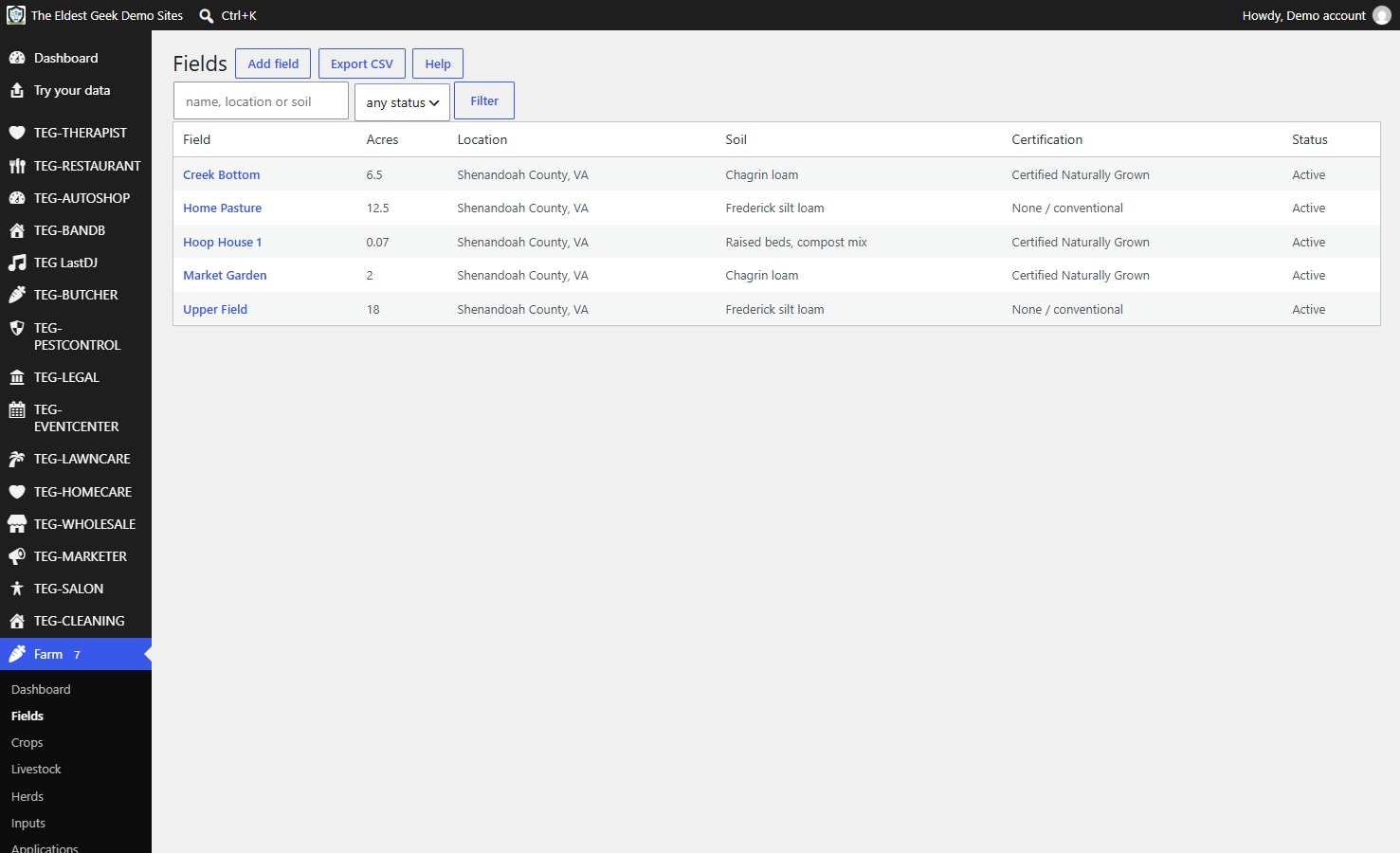
Fields
What would you save?
Filled in from the comparison sheet: Farmbrite Complete Essentials – $590/yr x 5; farm accounting included, no online store (farmbrite.com/pricing). Prices read on 12 November 2026; type your own bill to see yours.
| Years | What you pay now | TEG, yearly license | TEG, lifetime license | Difference |
|---|---|---|---|---|
| 1 year | $590 | $429 | $2,145 | you keep $161 |
| 3 years | $1,770 | $1,287 | $2,145 | you keep $483 |
| 5 years | $2,950 | $2,145 | $2,145 | you keep $805 |
TEG has no per-user fee: the license price is the same for one person or fifty. The lifetime license is paid once; the yearly one each year. Card processing, hardware and your hosting are left out on both sides.
What it does
- An application log built to what Virginia asks a pesticide applicator to record.
- Inputs counted in lots – seed, feed, fertilizer and chemicals – with expiry dates flagged before they pass.
- Harvest lots for traceability.
A whole-farm back office, tuned for Virginia: fields and plantings, livestock and herds, the inputs store counted in lots with EPA registration numbers and expiry dates, a spray and application log, harvest and traceability lots, equipment and its maintenance, the work log, and the sales side – farm stand, CSA and wholesale – with a compliance center and a document room that prints the records a farm is asked for.
Who it is for
Small and mid-size farms keeping their spray log, harvest lots and CSA on paper and three separate apps, and paying for each.
Why it beats what you are using now
- An application log built to what Virginia asks a pesticide applicator to record: the product lot and its EPA registration number, the field, the rate, the applicator, and the re-entry interval shown on the dashboard while it runs.
- Inputs counted in lots – seed, feed, fertilizer and chemicals – with expiry dates flagged before they pass.
- Harvest lots for traceability: which planting, which field, which day – the question a buyer or an inspector asks first.
- Sales: the farm stand, CSA shares and wholesale orders, with invoices and labels – and an online store where customers order from your website for pickup or delivery and pay through the invoice's pay link (off until you turn it on), with a customer page where they sign in by an e-mailed link to see their own orders and what is still owed.
- Spanish and French on Pro: each worker picks their own screen language, and invoices, CSA agreements, e-mails and texts always go out in the farm's own language.
- A document room that prints the application log, nutrient-management records, FSMA produce-safety logs, livestock health certificates, the agritourism warning sign, CSA agreements and, for an organic or transitioning farm, the organic records for your inspector. Record-keeping help, not legal advice: the farm still confirms its own obligations.
- Unlimited support by ticket at every price, in-person help if you want it, and a feature request that would help every shop gets built at no charge.
Manage it from your phone (TEG Companion)
TEG Companion is the staff app on your phone (iPhone or Android) or the counter PC (Windows) that works with your shop's own server – no cloud account in between. Every request runs as the person the phone is paired to, so it can do only what they may do on the website, and one phone can be paired with several TEG shops and switch between them. It is included with the shop license. Its reports go back up to twelve months, and in most shops a quote, invoice or order opened on the phone shows exactly the copy the customer gets. With the shop on the Pro edition, each phone can show the app in Spanish or French – on Android and Windows today, not on iPhone yet.
Try it on this demo: install TEG Companion, open Manage shops > Demo shops and choose TEG Farm. Your phone gets a demo sign-in of its own for this shop – no password to type – with the sample data on it, and the pairing ends by itself after seven days. Nothing you do there reaches a real person.
Opens TEG Companion in a new tab, already connected to this demo shop. Nothing to install. Sample data, rebuilt every night.
Scan to get the real app on your phone.
iPhone: on the App Store. The download page always carries the latest version for Android and Windows.
Download on theApp StoreDownload forAndroidDownload forWindows
In English, Spanish and French
Every TEG shop, and the TEG Companion app, run in English, Spanish and French. The language is a download inside the shop – Settings > Language, no reinstall – and the language packs need the Pro edition (the Language screen is there in every edition). Quotes, invoices, receipts, e-mails, texts and the customer pages follow the shop's language, whoever clicks the button, and each staff member can pick their own screen language. The phone apps: on Android and Windows now.
Need a language we do not list yet? Ask – we add it free for Pro and lifetime licenses.
Books, payroll and taxes: TEG Back Office, the Pro add-on – see it
New on this demo: TEG Farm, the released version. TEG Companion works with it.
Try it with your own data
Upload a CSV of your customers – an export from the program you use now (RepairShopr, RepairDesk, Jobber or a spreadsheet) – and see them inside the demo. Only you see them, and they are deleted after 24 hours.
What your customer sees
Your shop screen and your customer's page side by side, in a sandbox of your own: book as the customer, move the job on as the shop, text a pay link and pay it with a test card. Nothing is charged and nothing is sent.
How it compares
Farmbrite is the whole-farm record-keeping system small farms most often rent; Local Line is the online store and CSA platform many sell through. A farm often pays for both.
At a glance
TEG Farm beside Farmbrite, Local Line, Tend on the seven questions people ask first. Under every figure is where it comes from and when it was checked; "not published" means we did not find it on the vendor's own pages – it is not a No.
| Question | TEG Farm | Farmbrite | Local Line | Tend |
|---|---|---|---|---|
| Monthly price (lowest public plan) | No monthly plan: $429 a year or $2,145 once | Crop or livestock from $290/yr; Complete $590/yr (Essentials, no online store) or $790/yr (Performance, with the store)source, 12 Nov 2026 | Core $109/mo or $1,044/yr; CSA subscriptions +$278/yr on Coresource, 12 Nov 2026 | Free (1 user); Pro $30/mo (5 users), Ultimate $75/mosource, 12 Nov 2026 |
| Per-user fees | None: one license per site, unlimited users | not publishedsource, 29 Oct 2026 | not publishedsource, 29 Oct 2026 | not publishedsource, 29 Oct 2026 |
| Who holds your data | You: in your own WordPress database | not publishedsource, 29 Oct 2026 | not publishedsource, 29 Oct 2026 | not publishedsource, 29 Oct 2026 |
| Works offline / self-hosted | Self-hosted on your WordPress; when your site is down, so is it | not publishedsource, 29 Oct 2026 | not publishedsource, 29 Oct 2026 | not publishedsource, 29 Oct 2026 |
| Phone app | TEG Companion staff app (iPhone on the App Store, Android, Windows), included | not publishedsource, 29 Oct 2026 | not publishedsource, 29 Oct 2026 | not publishedsource, 29 Oct 2026 |
| Card payments | Farm stand, wholesale and CSA orders online through your own Square, Stripe or PayPal (a pay link on the invoice); Square Terminal at the stand; SNAP/EBT recorded | not publishedsource, 29 Oct 2026 | not publishedsource, 29 Oct 2026 | not publishedsource, 29 Oct 2026 |
| Free trial | 30 days, built in, no sign-up | not publishedsource, 29 Oct 2026 | not publishedsource, 29 Oct 2026 | not publishedsource, 29 Oct 2026 |
Where a cell says "better than us", it is. Prices change: ask a vendor to confirm their figure before you decide anything on it.
The vendors' own published list prices, read on 12 November 2026. Ask a vendor to confirm their figure before you decide anything on it.
The rows where a competitor matches us, or does it better, are left in. A comparison written only to flatter the seller is worth nothing to the person buying.
What would it cost you?
Pick what you use now, or type what you pay. Every competitor price below is the one on their own pricing page, with the date we read it.
| 1 year | 3 years | |
|---|---|---|
| What you pay now | $1,308 | $3,924 |
| TEG Farm, paid yearly (founding offer: first year at half price) | $214.50 you save $1,093.50 | $1,072.50 you save $2,851.50 |
| TEG Farm, lifetime license | $2,145 TEG costs $837 more | $2,145 you save $1,779 |
- Farmbrite: Crop or livestock from $290/yr; Complete $590/yr (Essentials, no online store) or $790/yr (Performance, with the store) – source, read 12 Nov 2026
- Local Line: Core $109/mo or $1,044/yr; CSA subscriptions +$278/yr on Core – source, read 12 Nov 2026
- Tend: Free (1 user); Pro $30/mo (5 users), Ultimate $75/mo – source, read 12 Nov 2026
Our prices are our own published ones, per site, with no per-user fee. A competitor's first listed monthly price is used; their yearly discounts, add-ons and payment fees are not in it, and prices change – check their page.
Switching to TEG Farm
Switching from Farmbrite, Local Line or Tend? Pick the program you use now to see how your records come across.
From Farmbrite
There is no ready column preset for Farmbrite's export. The CSV import lets you match each column by hand and do test runs before anything is saved.
From Local Line
There is no ready column preset for Local Line's export. The CSV import lets you match each column by hand and do test runs before anything is saved.
From Tend
There is no ready column preset for Tend's export. The CSV import lets you match each column by hand and do test runs before anything is saved.
Rather have it done for you? If you keep your customers or your stock in a spreadsheet, we bring them in. Then we walk your staff through it. Moving your records over
Your next step
Which plan fits me?
Save my plan tick what you need, see the price, keep a copy
See it on the phone
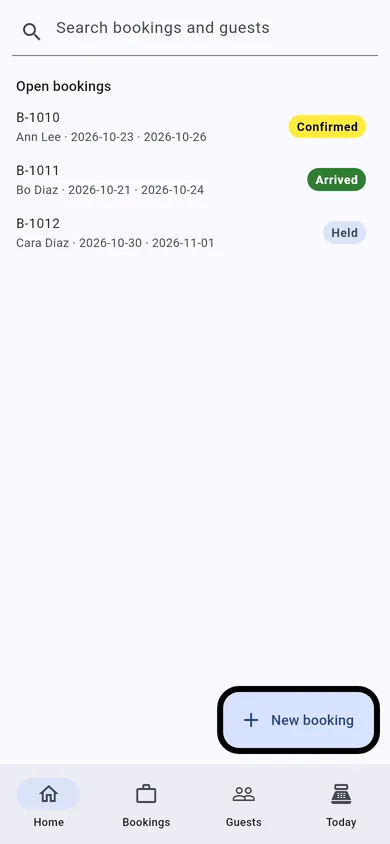
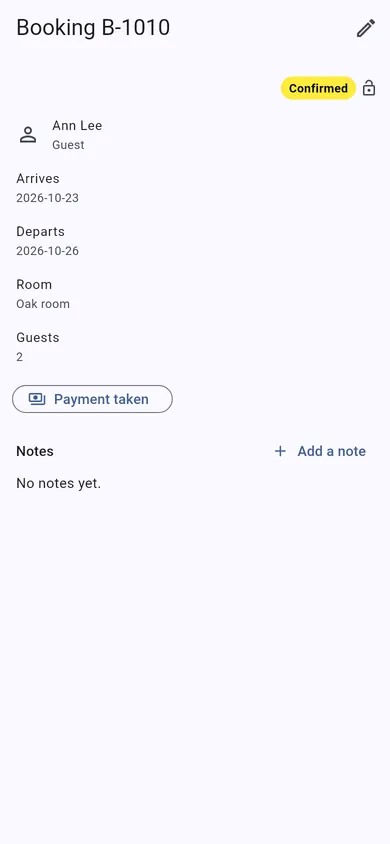
TEG Companion is the staff app that comes with the license. These are its real screens, not mock-ups.
These are TEG Companion's shared shop screens, shown with a sample booking. On your phone they show your own customers and work, in your trade's own words.
- No lock-in. It is a WordPress plugin on your own website. Your data stays in your own database, with you.
- Pay yearly or once. A lifetime license is $2,145, one time – or pay yearly if you prefer.
- Your data, out whenever you want. Backups of everything the shop holds, kept in a private folder on your server, that you can download and restore; CSV exports of your lists and reports.
- Your data stays on your server – we cannot see it. The only call home is the license check, and it sends no customer, job or sale.
Built by people who run a shop: TEG RepairShop, the first of the family, is built and run in a real repair shop – TopTech Computers in Alexandria, Virginia.
Get the comparison sheet and setup checklist
The sheet sets this software beside what you pay for now, row by row; the checklist is every step from install to your first day on it. The links show here as soon as you press the button. Nothing here is needed to try the demo.
Questions
What does TEG Farm cost?
$429 a year or $2,145 once, one site. Pro, with TEG Back Office and the language packs: $629 a year or $3,145 once. One site, no per-user fee, and support by ticket included.
Can I try it before I buy?
Yes, twice over: the live demo on this site, with sample data and no sign-up, and a free 30-day trial of the full Pro edition on your own website, with no card.
What happens when the trial ends?
Nothing is deleted and nothing is charged – there is no card on file. Without a license the shop pauses (you can still see your records, but not add to them) until you enter a license code; then you carry on with the same records.
Can I bring my records over?
Built in: Import from CSV takes the export of the system you use now (customers and, in most shops, their records too), matches the columns for you and checks every row before anything is saved. Anything it cannot read, we move for you.
How do I get my data out?
Backups of everything the shop holds, kept in a private folder on your server, that you can download and restore; CSV exports of your lists and reports.
Is there a phone app?
TEG Companion, the staff app for an iPhone, an Android phone or the counter PC (Windows), comes with the license and talks only to your own site. The iPhone app is on the App Store.
Does it work in Spanish?
Yes, with the Pro edition: Spanish and French language packs download by themselves and put the shop's customer paperwork, e-mails, texts and customer pages in that language; each staff member picks their own screen language, and on Android and Windows the phone apps follow each phone's language. Without Pro everything stays in English.
Does it do the books, payroll and taxes?
Yes, with TEG Back Office, included with Pro: payroll, bills and expenses, the sales tax return, 1099s and your books in GnuCash, QuickBooks or Xero. Everything it does is on the TEG Back Office page. From this shop it reads the staff by the rule every TEG shop shares: the shop's own staff first, then the others allowed into the back office, then the administrators, each once; the hours are typed in on the payroll run.
Where is my data kept?
In your own WordPress database, on your own hosting. Your data stays on your server – we cannot see it. There is no account with us that holds your customers, and no copy on our machines. (If you choose to have us host the site for you, it is on a server we look after, and we say so up front.)
Does the plugin send anything to you?
Only the license check and the list of language packs. For a paid license it asks our license server about once a day whether the license is still good, and it sends exactly this: which plugin and version, your site's domain name, a random install number made on your site, and your license code or a short fingerprint of it. It never sends a customer, a job, a sale or anything you typed. If our server cannot be reached the software keeps working. Twice a day the shop also reads the public list of language packs, and with Pro it downloads the packs it needs – that request carries no site address and nothing about your shop.
Who can see my records?
The people you give a WordPress account, with what you let them do. The phone apps talk only to your own site and do only what the person they are paired to may do there.
Open the live demoDownload & tryPrintable one-pager (PDF)Every trade