
TEG Creator
Software for an artist, a maker, a studio or a gallery
An original is sold once – on your site, at your booth and at every gallery.
Proposed: $249 a year or $1,245 once, one site. Pro $499 a year or $2,495 once.
What's new – Demo mode now takes no payment at all.
Try it live Start free trial How does it compare? Watch the full video (4 min)
See it in action
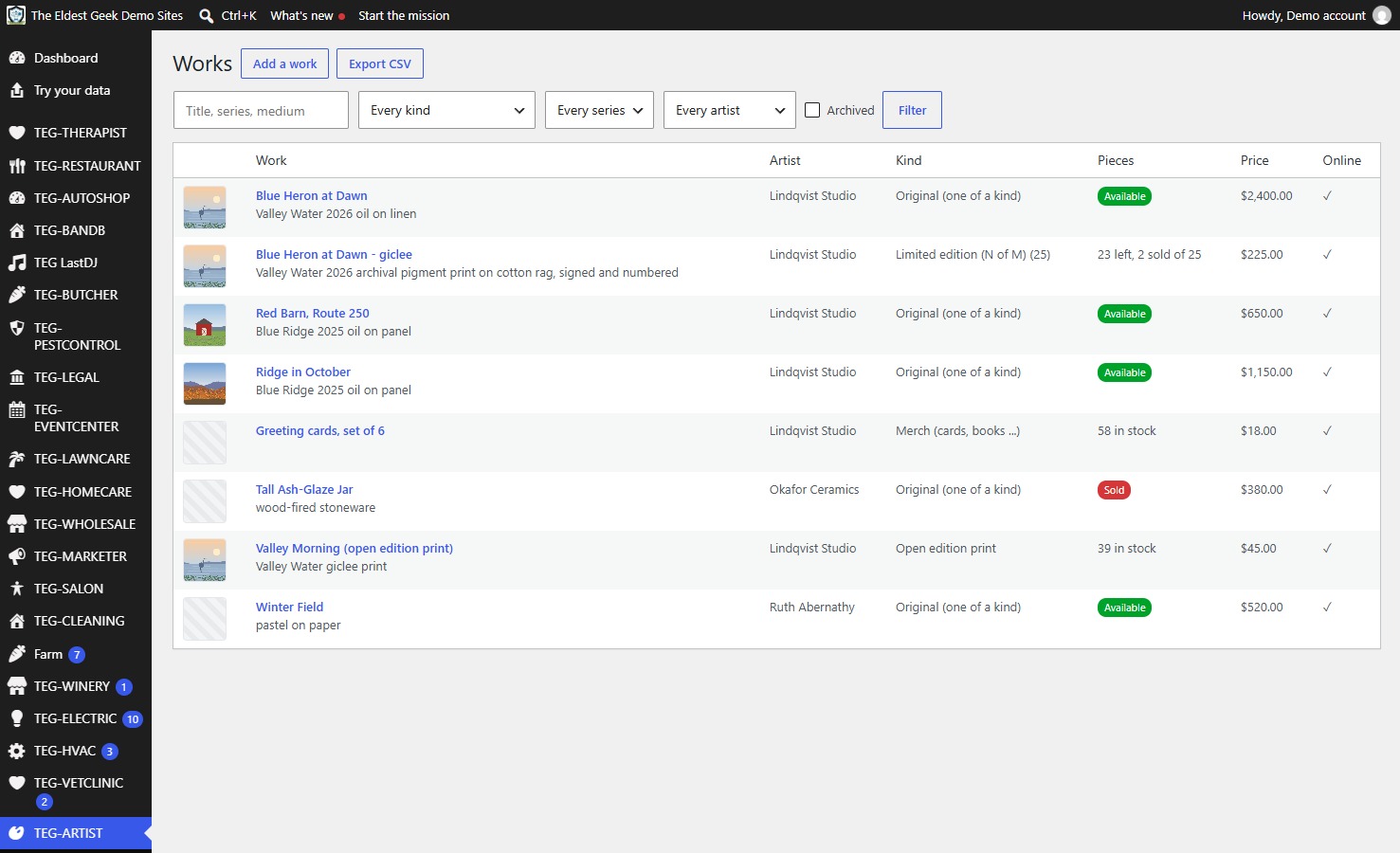
Works
What it does
- What kind of creative are you?
- For inventors and product makers.
- The sample studio adds one invented author with one book when Author is ticked.
TEG Creator is for artists, authors, musicians, makers and inventors: the back office and shop for working artists, studios, galleries and co-ops – and, since, for makers, inventors and product makers, photographers and videographers, musicians and performers, authors and poets, and teachers, each in their own words: the works catalog with originals, numbered limited editions, open-edition prints and merch; where every piece is; an online shop; private viewing rooms; booth sales on the phone; certificates of authenticity; collectors; and, on Pro, consignment for many member artists with payouts.
Who it is for
Artists, makers, galleries and other creatives keeping inventory in one app, the shop in another and consignment in a spreadsheet – and finding out a piece sold twice.
Why it beats what you are using now
- What kind of creative are you? Tick Maker, Inventor / product maker, Photographer / videographer, Musician / performer, Author / poet or Teacher – every one that fits – and the menus, screens, shop, receipts, certificates, e-mails and TEG Companion use your words (an author's studio says Books, Signings & readings, Bookstores and Readers). With only Maker ticked nothing changes.
- For inventors and product makers: Inventions & products, Units, Stockists, Customers and Materials; a limited edition becomes a numbered production run and an open edition a product counted in stock. It is for making and selling; it does not track patents, licensing or royalties.
- The sample studio adds one invented author with one book when Author is ticked.
- Sold once: every original and every edition number is one record with a unique key, so the website, the booth phone, the studio till and a gallery reporting a sale cannot sell the same piece twice.
- Where is it: studio, a gallery on consignment with the agreement and due-back date, a show, lent, at the framer – dated, with overdue flags, and what each gallery holds and owes you.
- Private viewing rooms: chosen works for one collector behind a link that runs out, with their own prices; a reserved piece is held on every channel until you sell or release it, with an optional deposit paid online.
- Booth sales on TEG Companion: scan a label, sell, or send a pay link to the buyer's phone, with each show's own sales tax rate.
- Certificates of authenticity with a QR code to a public verify page, and price lists and tearsheets as PDF.
- Pro, for galleries and co-ops: the split written at the moment of sale, payouts, private-link statements and the balance owed per artist – and staff screens in Spanish or French while collectors get the studio's own language.
- Unlimited support by ticket at every price, in-person help if you want it, and a feature request that would help every shop gets built at no charge.
Manage it from your phone (TEG Companion)
TEG Companion is the staff app on your phone (iPhone or Android) or the counter PC (Windows) that works with your shop's own server – no cloud account in between. Every request runs as the person the phone is paired to, so it can do only what they may do on the website, and one phone can be paired with several TEG shops and switch between them. It is included with the shop license. Its reports go back up to twelve months, and in most shops a quote, invoice or order opened on the phone shows exactly the copy the customer gets. With the shop on the Pro edition, each phone can show the app in Spanish or French – on Android and Windows today, not on iPhone yet.
Try it on this demo: install TEG Companion, open Manage shops > Demo shops and choose TEG Creator. Your phone gets a demo sign-in of its own for this shop – no password to type – with the sample data on it, and the pairing ends by itself after seven days. Nothing you do there reaches a real person.
Opens TEG Companion in a new tab, already connected to this demo shop. Nothing to install. Sample data, rebuilt every night.
Scan to get the real app on your phone.
iPhone: on the App Store. The download page always carries the latest version for Android and Windows.
Download on theApp StoreDownload forAndroidDownload forWindows
In English, Spanish and French
Every TEG shop, and the TEG Companion app, run in English, Spanish and French. The language is a download inside the shop – Settings > Language, no reinstall – and the language packs need the Pro edition (the Language screen is there in every edition). Quotes, invoices, receipts, e-mails, texts and the customer pages follow the shop's language, whoever clicks the button, and each staff member can pick their own screen language. The phone apps: on Android and Windows now.
Need a language we do not list yet? Ask – we add it free for Pro and lifetime licenses.
Books, payroll and taxes: TEG Back Office, the Pro add-on – see it
New on this demo: TEG Creator, the released beta – its price is proposed and it is not on the store yet. TEG Companion works with it.
Try it with your own data
Upload a CSV of your customers – an export from the program you use now (RepairShopr, RepairDesk, Jobber or a spreadsheet) – and see them inside the demo. Only you see them, and they are deleted after 24 hours.
What your customer sees
Your shop screen and your customer's page side by side, in a sandbox of your own: book as the customer, move the job on as the shop, text a pay link and pay it with a test card. Nothing is charged and nothing is sent.
How it compares
Artwork Archive is the inventory system many working artists use; ArtCloud (now Artlogic Connect, after its 2025 merger with Artlogic) and Artlogic are the gallery systems; Square Online is the free shop a solo artist starts on. For a solo artist the market is crowded and cheap, and TEG Creator is not the cheapest.
At a glance
TEG Creator beside Artwork Archive, ArtCloud, Artlogic on the seven questions people ask first. Under every figure is where it comes from and when it was checked; "not published" means we did not find it on the vendor's own pages – it is not a No.
| Question | TEG Creator | Artwork Archive | ArtCloud | Artlogic |
|---|---|---|---|---|
| Monthly price (lowest public plan) | No monthly plan: $249 a year or $1,245 once | $9 / $18 / $36 a month billed yearly ($21 / $42 monthly); Master is multi-usersource, 6 Nov 2026 | Now Artlogic Connect: Gallery Manager free (1 user, 50 artworks) or $99 a user a month; Artist Manager $26 / $80 / $134 a monthsource, 12 Nov 2026 | From GBP 156 a month (Essential) or GBP 311 (Professional); Gallery Management module from GBP 90 a user a monthsource, 12 Nov 2026 |
| Per-user fees | None: one license per site, unlimited users | not publishedsource, 29 Oct 2026 | Per user (Gallery Manager); Artist Manager per accountsource, 12 Nov 2026 | Platform per gallery; the Gallery Management module per usersource, 12 Nov 2026 |
| Who holds your data | You: in your own WordPress database | not publishedsource, 29 Oct 2026 | not publishedsource, 29 Oct 2026 | not publishedsource, 29 Oct 2026 |
| Works offline / self-hosted | Self-hosted on your WordPress; when your site is down, so is it | not publishedsource, 29 Oct 2026 | not publishedsource, 29 Oct 2026 | not publishedsource, 29 Oct 2026 |
| Phone app | TEG Companion staff app (iPhone on the App Store, Android, Windows), included | not publishedsource, 29 Oct 2026 | not publishedsource, 29 Oct 2026 | not publishedsource, 29 Oct 2026 |
| Card payments | Online through your own Square, Stripe or PayPal (shop and pay links); at the booth, cash or your own reader; Square Terminal at the counter | not publishedsource, 29 Oct 2026 | not publishedsource, 29 Oct 2026 | not publishedsource, 29 Oct 2026 |
| Free trial | 30 days, built in, no sign-up | not publishedsource, 29 Oct 2026 | not publishedsource, 29 Oct 2026 | not publishedsource, 29 Oct 2026 |
Where a cell says "better than us", it is. Prices change: ask a vendor to confirm their figure before you decide anything on it.
The vendors' own published list prices, read on 12 November 2026. Ask a vendor to confirm their figure before you decide anything on it.
The rows where a competitor matches us, or does it better, are left in. A comparison written only to flatter the seller is worth nothing to the person buying.
Switching to TEG Creator
Switching from Artwork Archive, ArtCloud, Artlogic or Square Online? Pick the program you use now to see how your records come across.
From Artwork Archive
There is no ready column preset for Artwork Archive's export. The CSV import lets you match each column by hand and do test runs before anything is saved.
From ArtCloud
There is no ready column preset for ArtCloud's export. The CSV import lets you match each column by hand and do test runs before anything is saved.
From Artlogic
There is no ready column preset for Artlogic's export. The CSV import lets you match each column by hand and do test runs before anything is saved.
From Square Online
There is no ready column preset for Square Online's export. The CSV import lets you match each column by hand and do test runs before anything is saved.
Rather have it done for you? If you keep your customers or your stock in a spreadsheet, we bring them in. Then we walk your staff through it. Moving your records over
Your next step
See it on the phone
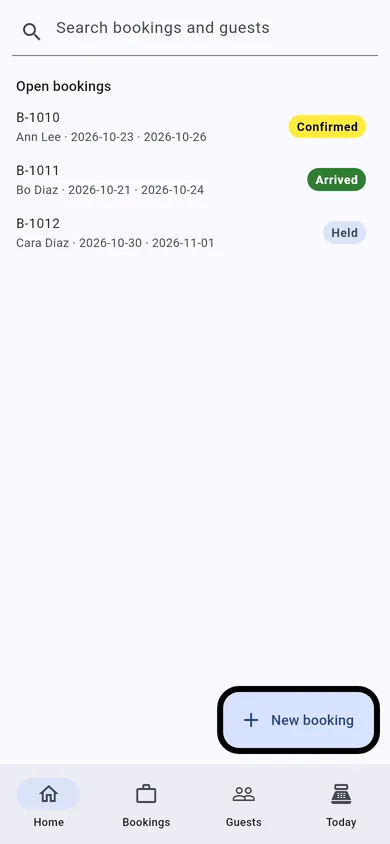
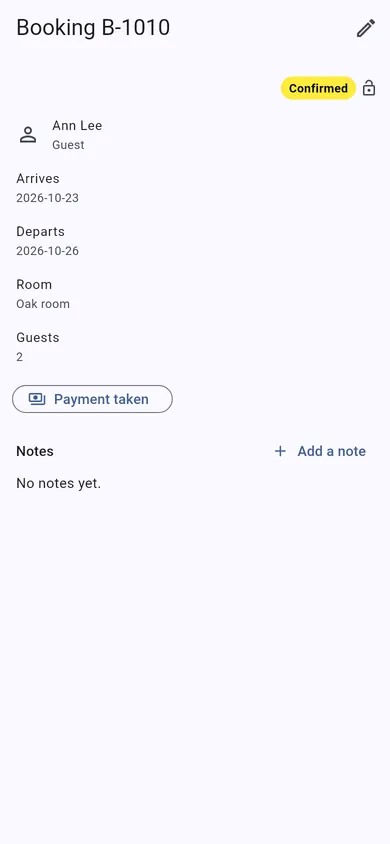
TEG Companion is the staff app that comes with the license. These are its real screens, not mock-ups.
These are TEG Companion's shared shop screens, shown with a sample booking. On your phone they show your own customers and work, in your trade's own words.
- No lock-in. It is a WordPress plugin on your own website. Your data stays in your own database, with you.
- Pay yearly or once. A lifetime license is $1,245, one time – or pay yearly if you prefer.
- Your data, out whenever you want. Backups of everything the shop holds, kept in a private folder on your server, that you can download and restore; CSV exports of your lists and reports.
- Your data stays on your server – we cannot see it. The only call home is the license check, and it sends no customer, job or sale.
Built by people who run a shop: TEG RepairShop, the first of the family, is built and run in a real repair shop – TopTech Computers in Alexandria, Virginia.
Get the comparison sheet and setup checklist
The sheet sets this software beside what you pay for now, row by row; the checklist is every step from install to your first day on it. The links show here as soon as you press the button. Nothing here is needed to try the demo.
Questions
What does TEG Creator cost?
Proposed: $249 a year or $1,245 once, one site. Pro $499 a year or $2,495 once. One site, no per-user fee, and support by ticket included.
Can I try it before I buy?
Yes, twice over: the live demo on this site, with sample data and no sign-up, and a free 30-day trial of the full Pro edition on your own website, with no card.
What happens when the trial ends?
Nothing is deleted and nothing is charged – there is no card on file. Without a license the shop pauses (you can still see your records, but not add to them) until you enter a license code; then you carry on with the same records.
Can I bring my records over?
Built in: Import from CSV takes the export of the system you use now (customers and, in most shops, their records too), matches the columns for you and checks every row before anything is saved. Anything it cannot read, we move for you.
How do I get my data out?
Backups of everything the shop holds, kept in a private folder on your server, that you can download and restore; CSV exports of your lists and reports.
Is there a phone app?
TEG Companion, the staff app for an iPhone, an Android phone or the counter PC (Windows), comes with the license and talks only to your own site. The iPhone app is on the App Store.
Does it work in Spanish?
Yes, with the Pro edition: Spanish and French language packs download by themselves and put the shop's customer paperwork, e-mails, texts and customer pages in that language; each staff member picks their own screen language, and on Android and Windows the phone apps follow each phone's language. Without Pro everything stays in English.
Does it do the books, payroll and taxes?
Yes, with TEG Back Office, included with Pro: payroll, bills and expenses, the sales tax return, 1099s and your books in GnuCash, QuickBooks or Xero. Everything it does is on the TEG Back Office page. From this shop it reads the staff by the rule every TEG shop shares: the shop's own staff first, then the others allowed into the back office, then the administrators, each once; the hours are typed in on the payroll run.
Where is my data kept?
In your own WordPress database, on your own hosting. Your data stays on your server – we cannot see it. There is no account with us that holds your customers, and no copy on our machines. (If you choose to have us host the site for you, it is on a server we look after, and we say so up front.)
Does the plugin send anything to you?
Only the license check and the list of language packs. For a paid license it asks our license server about once a day whether the license is still good, and it sends exactly this: which plugin and version, your site's domain name, a random install number made on your site, and your license code or a short fingerprint of it. It never sends a customer, a job, a sale or anything you typed. If our server cannot be reached the software keeps working. Twice a day the shop also reads the public list of language packs, and with Pro it downloads the packs it needs – that request carries no site address and nothing about your shop.
Who can see my records?
The people you give a WordPress account, with what you let them do. The phone apps talk only to your own site and do only what the person they are paired to may do there.
Open the live demoDownload & tryPrintable one-pager (PDF)Every trade