
TEG HVAC
Software for a heating and cooling contractor
Schedule service calls, keep each home's equipment and the EPA refrigerant log, and sell maintenance agreements that book their own tune-ups. Good / better / best proposals from your price book, then invoice and get paid – from your own website.
$795 a year or $3,995 once, one site. Pro, with TEG Back Office, the leak-rate log and language packs: $1,295 a year or $6,495 once.
What's new – New: a "Send with Rover" button on an open job's screen.
Try it live Start free trial How does it compare? Save my plan Watch the full video (4 min)
See it in action
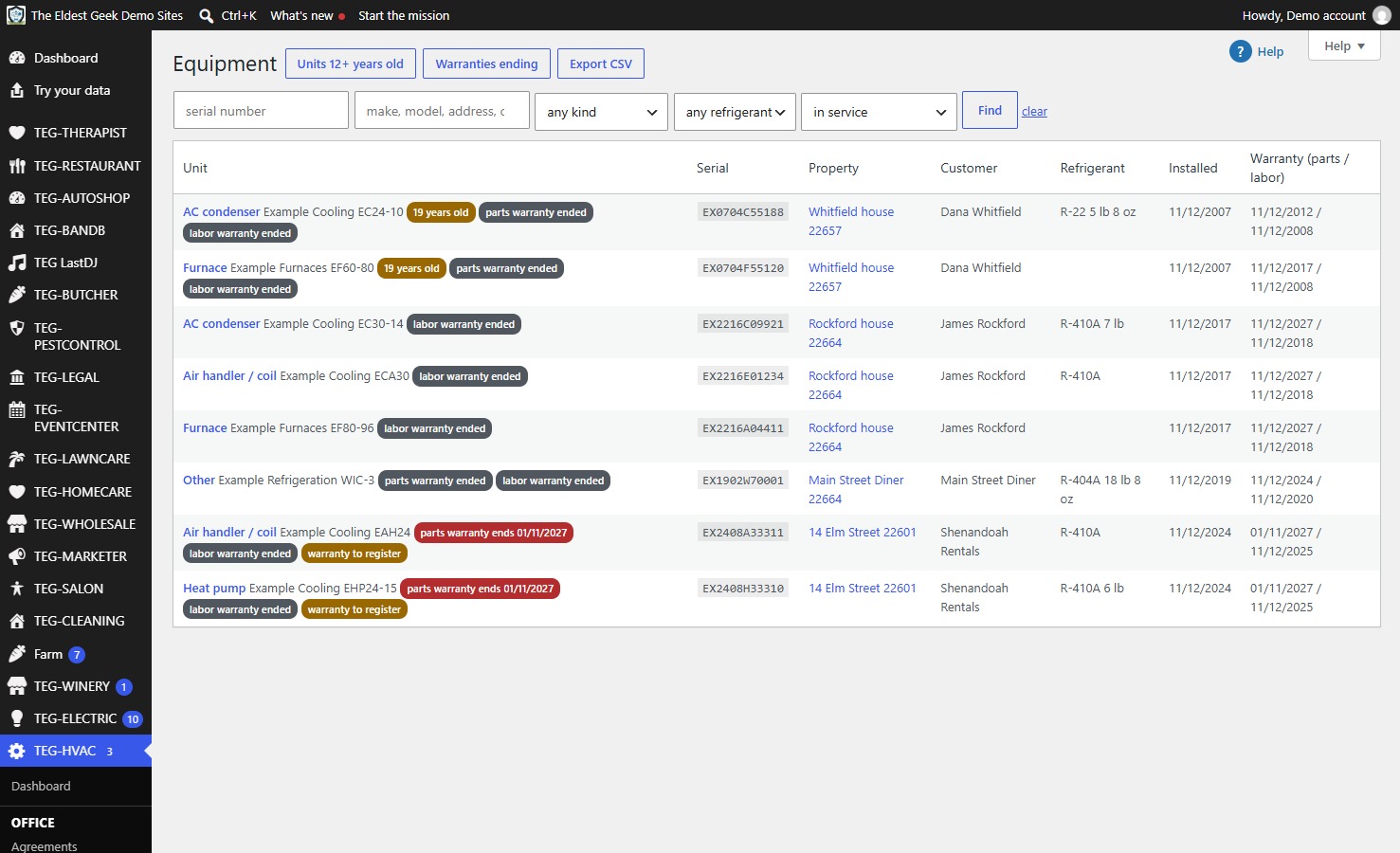
Equipment register
What would you save?
Filled in from the comparison sheet: Housecall Pro Essentials (5 users) – $149/mo billed yearly x 60; $189 month to month (housecallpro.com/pricing). Prices read on 12 November 2026; type your own bill to see yours.
| Years | What you pay now | TEG, yearly license | TEG, lifetime license | Difference |
|---|---|---|---|---|
| 1 year | $1,788 | $795 | $3,995 | you keep $993 |
| 3 years | $5,364 | $2,385 | $3,995 | you keep $2,979 |
| 5 years | $8,940 | $3,975 | $3,995 | you keep $4,965 |
TEG has no per-user fee: the license price is the same for one person or fifty. The lifetime license is paid once; the yearly one each year. Card processing, hardware and your hosting are left out on both sides.
What it does
- One price for the shop, not per technician.
- An equipment register per property.
- A refrigerant log with the technician and their 608 certification on every entry, added, recovered or sent for reclamation, with monthly totals.
For a heating and cooling contractor with one to ten technicians: customers and the homes they own, the equipment in each home, a week schedule, service checklists with readings, a refrigerant log kept for EPA Section 608 record-keeping, maintenance agreements that book their own tune-ups, a flat-rate price book with good / better / best proposals, invoices and payments.
Who it is for
HVAC contractors paying per technician, every month, for software that keeps their customer list on somebody else's server.
Why it beats what you are using now
- One price for the shop, not per technician: add your fourth tech or your tenth and the bill does not move.
- An equipment register per property: make, model, serial, refrigerant, install date and warranty end dates, with each unit's service history.
- A refrigerant log with the technician and their 608 certification on every entry, added, recovered or sent for reclamation, with monthly totals.
- Checklists with readings: the temperature split worked out and out-of-range readings flagged, with a report for the customer.
- Maintenance agreements that put the tune-ups on the board weeks ahead, with the member discount.
- A flat-rate price book you own (CSV in and out) and good / better / best proposals where the customer's pick becomes the job, with one labor line at the technician's, urgent or emergency rate.
- On Pro: the light-commercial leak-rate log, and Spanish and French for everything a customer receives – quotes, invoices, service reports, reminders, e-mails and texts – while each staff member picks their own screen language.
- Unlimited support by ticket at every price, in-person help if you want it, and a feature request that would help every shop gets built at no charge.
Manage it from your phone (TEG Companion)
TEG Companion is the staff app on your phone (iPhone or Android) or the counter PC (Windows) that works with your shop's own server – no cloud account in between. Every request runs as the person the phone is paired to, so it can do only what they may do on the website, and one phone can be paired with several TEG shops and switch between them. It is included with the shop license. Its reports go back up to twelve months, and in most shops a quote, invoice or order opened on the phone shows exactly the copy the customer gets. With the shop on the Pro edition, each phone can show the app in Spanish or French – on Android and Windows today, not on iPhone yet.
Try it on this demo: install TEG Companion, open Manage shops > Demo shops and choose TEG HVAC. Your phone gets a demo sign-in of its own for this shop – no password to type – with the sample data on it, and the pairing ends by itself after seven days. Nothing you do there reaches a real person.
Opens TEG Companion in a new tab, already connected to this demo shop. Nothing to install. Sample data, rebuilt every night.
Scan to get the real app on your phone.
iPhone: on the App Store. The download page always carries the latest version for Android and Windows.
Download on theApp StoreDownload forAndroidDownload forWindows
TEG Rover: the house-call phone app Add-on
For technicians out on service calls, tune-ups, warranty calls, installs, estimate visits and permit inspections. In use now: on iPhone from the App Store, and on Android (Android 7 or newer) downloaded straight to the phone, paired with the shop by a QR code. The Android download page always carries the latest version. A paid add-on: one phone is included with Pro and each extra phone is $99 a year; with Standard, $99 a year per phone. Until the add-on license is on sale it runs on the shop's own license.
Download on theApp StoreDownload forAndroid
- The office sends service calls, tune-ups, warranty calls, installs, estimate visits and permit inspections with a priority (urgent, high, normal, low) and a checklist set per visit type.
- An on-call technician sees the board of open calls and claims one – two technicians can never take the same call.
- Navigate hands off to Waze, Google Maps or Apple Maps – each person picks their own – with the in-app map as a preview; near the address the phone offers to mark the arrival (a 150 m zone), even while the other maps app is on screen.
- Every checklist item must be ticked before the visit can be completed; the completion is uploaded and closes the call.
- The dispatcher sees each technician's last check-in and which one is closest. GPS check-ins every 5-10 minutes, and ONLY while the technician is on shift.
- No signal at the address? The finished visit waits on the phone and is sent when the signal returns.
- In TEG HVAC: Send with Rover on an open diary job – a service call, tune-up, warranty call, install, estimate visit or permit inspection, each a visit. Rover is always on in TEG HVAC.
The big field-service apps have GPS and checklists too. The difference: one flat yearly price per phone rather than a monthly fee per technician, the data stays on your own site, each phone pairs by scanning a QR code with its own key you can revoke – no passwords – and location is shared only on shift.
In English, Spanish and French
Every TEG shop, and the TEG Companion and TEG Rover apps, run in English, Spanish and French. The language is a download inside the shop – Settings > Language, no reinstall – and the language packs need the Pro edition (the Language screen is there in every edition). Quotes, invoices, receipts, e-mails, texts and the customer pages follow the shop's language, whoever clicks the button, and each staff member can pick their own screen language. The phone apps: on Android and Windows now.
Need a language we do not list yet? Ask – we add it free for Pro and lifetime licenses.
Books, payroll and taxes: TEG Back Office, the Pro add-on – see it
New on this demo: TEG HVAC, the released version. TEG Companion and TEG Rover work with it.
Try it with your own data
Upload a CSV of your customers – an export from the program you use now (RepairShopr, RepairDesk, Jobber or a spreadsheet) – and see them inside the demo. Only you see them, and they are deleted after 24 hours.
What your customer sees
Your shop screen and your customer's page side by side, in a sandbox of your own: book as the customer, move the job on as the shop, text a pay link and pay it with a test card. Nothing is charged and nothing is sent.
How it compares
Housecall Pro and Jobber are the field-service platforms a small HVAC contractor most often rents; ServiceTitan is the one a bigger shop is sold. All three charge by the month and by the technician or user tier.
At a glance
TEG HVAC beside Housecall Pro, Jobber, ServiceTitan on the seven questions people ask first. Under every figure is where it comes from and when it was checked; "not published" means we did not find it on the vendor's own pages – it is not a No.
| Question | TEG HVAC | Housecall Pro | Jobber | ServiceTitan |
|---|---|---|---|---|
| Monthly price (lowest public plan) | No monthly plan: $795 a year or $3,995 once | $79/mo Basic (1 user); $189/mo Essentials (5 users); $329/mo MAX (8 users) – $59/$149/$299 billed yearlysource, 12 Nov 2026 | Core $29/mo (1 user); Connect $149/mo, Grow $229/mo for 5 users, billed yearly ($49 / $199 / $299 month to month)source, 12 Nov 2026 | not published (third-party estimates $245-$500 per technician per month; implementation $5,000-$50,000)source, 12 Nov 2026 |
| Per-user fees | None: one license per site, unlimited users | Tiers with user caps (1 / 5 / 8 users); $35/mo per additional user on MAXsource, 12 Nov 2026 | Tiers with user caps; add users for $29/mo eachsource, 12 Nov 2026 | Per technician, annual minimum contractsource, 12 Nov 2026 |
| Who holds your data | You: in your own WordPress database | not publishedsource, 23 Oct 2026 | not publishedsource, 23 Oct 2026 | not publishedsource, 23 Oct 2026 |
| Works offline / self-hosted | Self-hosted on your WordPress; when your site is down, so is it | not publishedsource, 23 Oct 2026 | not publishedsource, 23 Oct 2026 | not publishedsource, 23 Oct 2026 |
| Phone app | TEG Companion staff app (iPhone on the App Store, Android, Windows), included | not publishedsource, 23 Oct 2026 | not publishedsource, 23 Oct 2026 | Yes: field mobile appsource, 23 Oct 2026 |
| Card payments | Online on an invoice through your own Square, Stripe or PayPal; Send to Square Terminal on the invoice; take payment on an invoice in TEG Companion | Yes: their own payment processingsource, 23 Oct 2026 | not publishedsource, 23 Oct 2026 | not publishedsource, 23 Oct 2026 |
| Free trial | 30 days, built in, no sign-up | not publishedsource, 23 Oct 2026 | not publishedsource, 23 Oct 2026 | not publishedsource, 23 Oct 2026 |
Where a cell says "better than us", it is. Prices change: ask a vendor to confirm their figure before you decide anything on it.
The vendors' own published list prices, read on 12 November 2026. Ask a vendor to confirm their figure before you decide anything on it.
The rows where a competitor matches us, or does it better, are left in. A comparison written only to flatter the seller is worth nothing to the person buying.
What would it cost you?
Pick what you use now, or type what you pay. Every competitor price below is the one on their own pricing page, with the date we read it.
| 1 year | 3 years | |
|---|---|---|
| What you pay now | $948 | $2,844 |
| TEG HVAC, paid yearly (founding offer: first year at half price) | $397.50 you save $550.50 | $1,987.50 you save $856.50 |
| TEG HVAC, lifetime license | $3,995 TEG costs $3,047 more | $3,995 TEG costs $1,151 more |
- Housecall Pro: $79/mo Basic (1 user); $189/mo Essentials (5 users); $329/mo MAX (8 users) – $59/$149/$299 billed yearly – source, read 12 Nov 2026
- Jobber: Core $29/mo (1 user); Connect $149/mo, Grow $229/mo for 5 users, billed yearly ($49 / $199 / $299 month to month) – source, read 12 Nov 2026
- ServiceTitan: not published (third-party estimates $245-$500 per technician per month; implementation $5,000-$50,000) – source, read 12 Nov 2026
Our prices are our own published ones, per site, with no per-user fee. A competitor's first listed monthly price is used; their yearly discounts, add-ons and payment fees are not in it, and prices change – check their page.
Switching to TEG HVAC
Switching from Housecall Pro, Jobber or ServiceTitan? Pick the program you use now to see how your records come across.
From Housecall Pro
There is no ready column preset for Housecall Pro's export. The CSV import lets you match each column by hand and do test runs before anything is saved.
From Jobber
Ready preset The CSV import has a ready column preset for Jobber's export: its columns are matched for you.
It brings in your customers: First name, Last name, Company, Address, Address line 2, City, State / province, ZIP / postcode, Country.
To get the file: Clients > More Actions > Export Clients (e-mailed, 1,500 rows per file). E-mail and phone columns are matched by the generic names (not named on the help page).
From ServiceTitan
There is no ready column preset for ServiceTitan's export. The CSV import lets you match each column by hand and do test runs before anything is saved.
Rather have it done for you? If you keep your customers or your stock in a spreadsheet, we bring them in. Then we walk your staff through it. Moving your records over
Your next step
Which plan fits me?
Save my plan tick what you need, see the price, keep a copy
See it on the phone
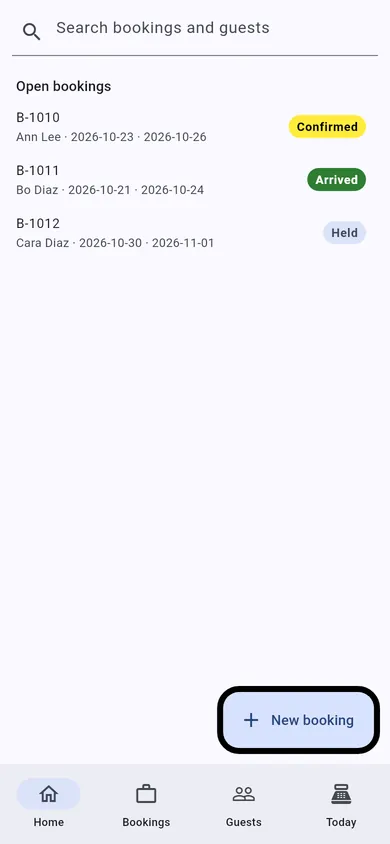
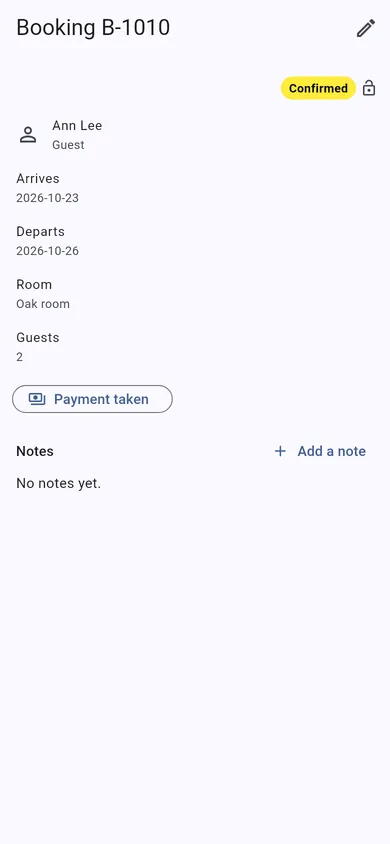
TEG Companion is the staff app that comes with the license. These are its real screens, not mock-ups.
These are TEG Companion's shared shop screens, shown with a sample booking. On your phone they show your own customers and work, in your trade's own words.
- No lock-in. It is a WordPress plugin on your own website. Your data stays in your own database, with you.
- Pay yearly or once. A lifetime license is $3,995, one time – or pay yearly if you prefer.
- Your data, out whenever you want. Backups of everything the shop holds, kept in a private folder on your server, that you can download and restore; CSV exports of your lists and reports.
- Your data stays on your server – we cannot see it. The only call home is the license check, and it sends no customer, job or sale.
Built by people who run a shop: TEG RepairShop, the first of the family, is built and run in a real repair shop – TopTech Computers in Alexandria, Virginia.
Get the comparison sheet and setup checklist
The sheet sets this software beside what you pay for now, row by row; the checklist is every step from install to your first day on it. The links show here as soon as you press the button. Nothing here is needed to try the demo.
Questions
What does TEG HVAC cost?
$795 a year or $3,995 once, one site. Pro, with TEG Back Office, the leak-rate log and language packs: $1,295 a year or $6,495 once. One site, no per-user fee, and support by ticket included.
Can I try it before I buy?
Yes, twice over: the live demo on this site, with sample data and no sign-up, and a free 30-day trial of the full Pro edition on your own website, with no card.
What happens when the trial ends?
Nothing is deleted and nothing is charged – there is no card on file. Without a license the shop pauses (you can still see your records, but not add to them) until you enter a license code; then you carry on with the same records.
Can I bring my records over?
Built in: Import from CSV takes the export of the system you use now (customers and, in most shops, their records too), matches the columns for you and checks every row before anything is saved. Anything it cannot read, we move for you.
How do I get my data out?
Backups of everything the shop holds, kept in a private folder on your server, that you can download and restore; CSV exports of your lists and reports.
Is there a phone app?
TEG Companion, the staff app for an iPhone, an Android phone or the counter PC (Windows), comes with the license and talks only to your own site. The iPhone app is on the App Store. TEG Rover, the app for work away from the shop, works with this shop too, on iPhone from the App Store and on Android. One phone is included with Pro; each extra phone is $99 a year. With Standard, $99 a year per phone.
Does it work in Spanish?
Yes, with the Pro edition: Spanish and French language packs download by themselves and put the shop's customer paperwork, e-mails, texts and customer pages in that language; each staff member picks their own screen language, and on Android and Windows the phone apps follow each phone's language. Without Pro everything stays in English.
Does it do the books, payroll and taxes?
Yes, with TEG Back Office, included with Pro: payroll, bills and expenses, the sales tax return, 1099s and your books in GnuCash, QuickBooks or Xero. Everything it does is on the TEG Back Office page. From this shop it reads the staff by the rule every TEG shop shares: the shop's own staff first, then the others allowed into the back office, then the administrators, each once; the hours are typed in on the payroll run.
Where is my data kept?
In your own WordPress database, on your own hosting. Your data stays on your server – we cannot see it. There is no account with us that holds your customers, and no copy on our machines. (If you choose to have us host the site for you, it is on a server we look after, and we say so up front.)
Does the plugin send anything to you?
Only the license check and the list of language packs. For a paid license it asks our license server about once a day whether the license is still good, and it sends exactly this: which plugin and version, your site's domain name, a random install number made on your site, and your license code or a short fingerprint of it. It never sends a customer, a job, a sale or anything you typed. If our server cannot be reached the software keeps working. Twice a day the shop also reads the public list of language packs, and with Pro it downloads the packs it needs – that request carries no site address and nothing about your shop.
Who can see my records?
The people you give a WordPress account, with what you let them do. The phone apps talk only to your own site and do only what the person they are paired to may do there.
Open the live demoDownload & tryPrintable one-pager (PDF)Every trade