
TEG Restaurant
Software for a bar and restaurant
Run bookings, orders, the menu and the bar from your own website.
$599 a year or $2,995 once, one site. Pro $999 a year or $4,995 once. A free 30-day Pro trial is built in, with no sign-up.
What's new – Changed: the website shortcodes for the bread club, custom cakes and food truck now have clear names.
Try it live Start free trial How does it compare? Save my plan Watch the full video (4 min)
See it in action
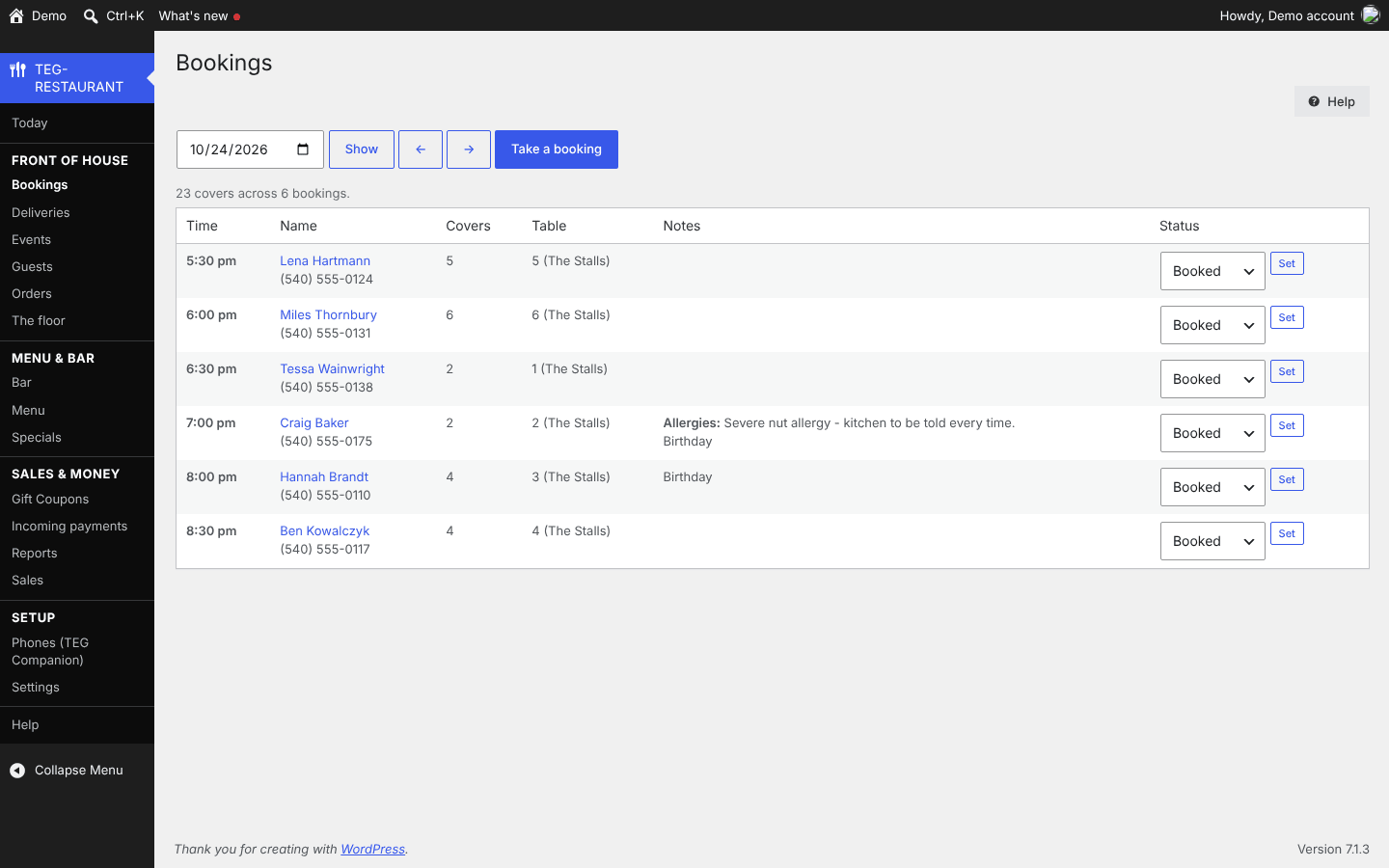
Bookings 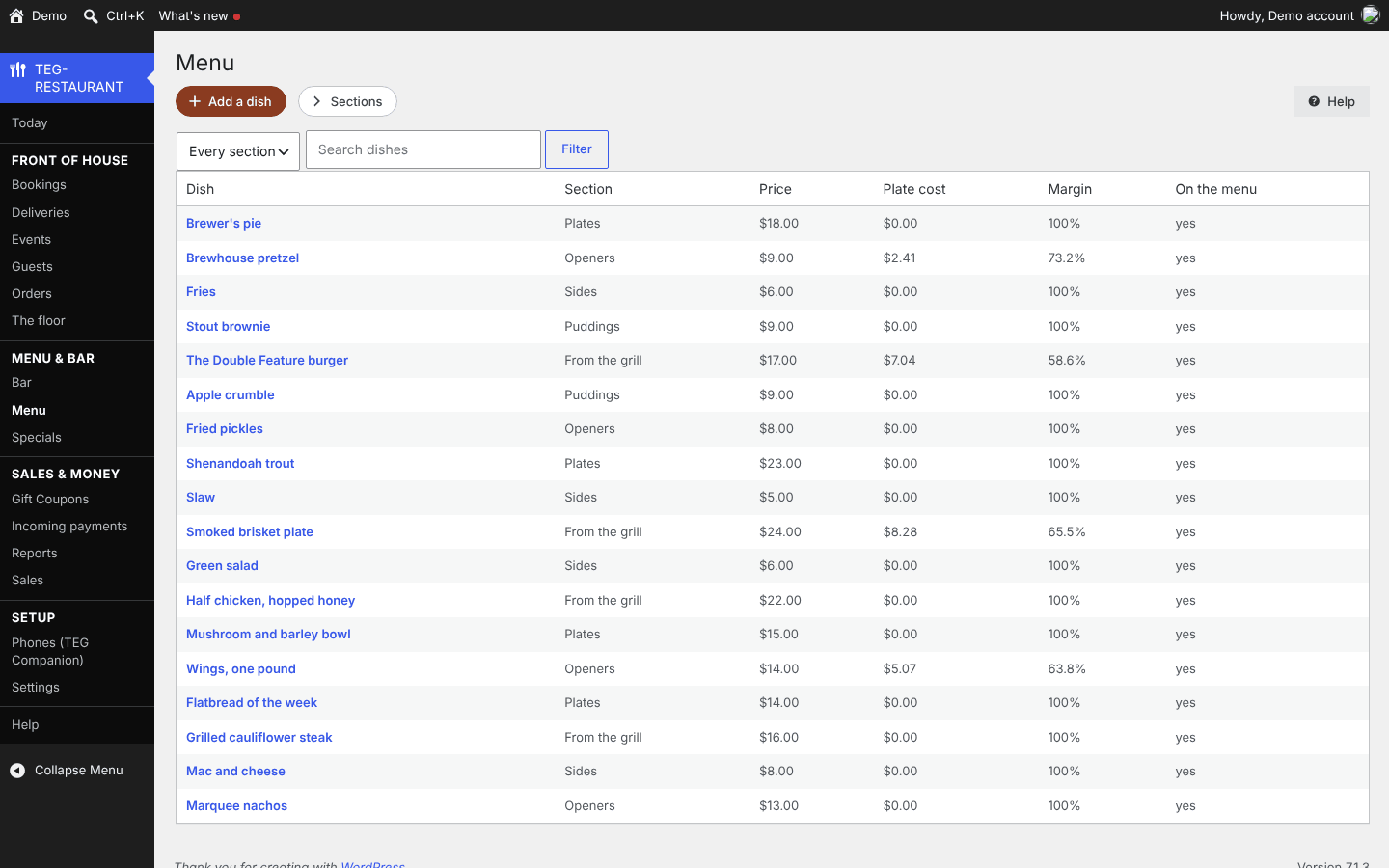
Menu 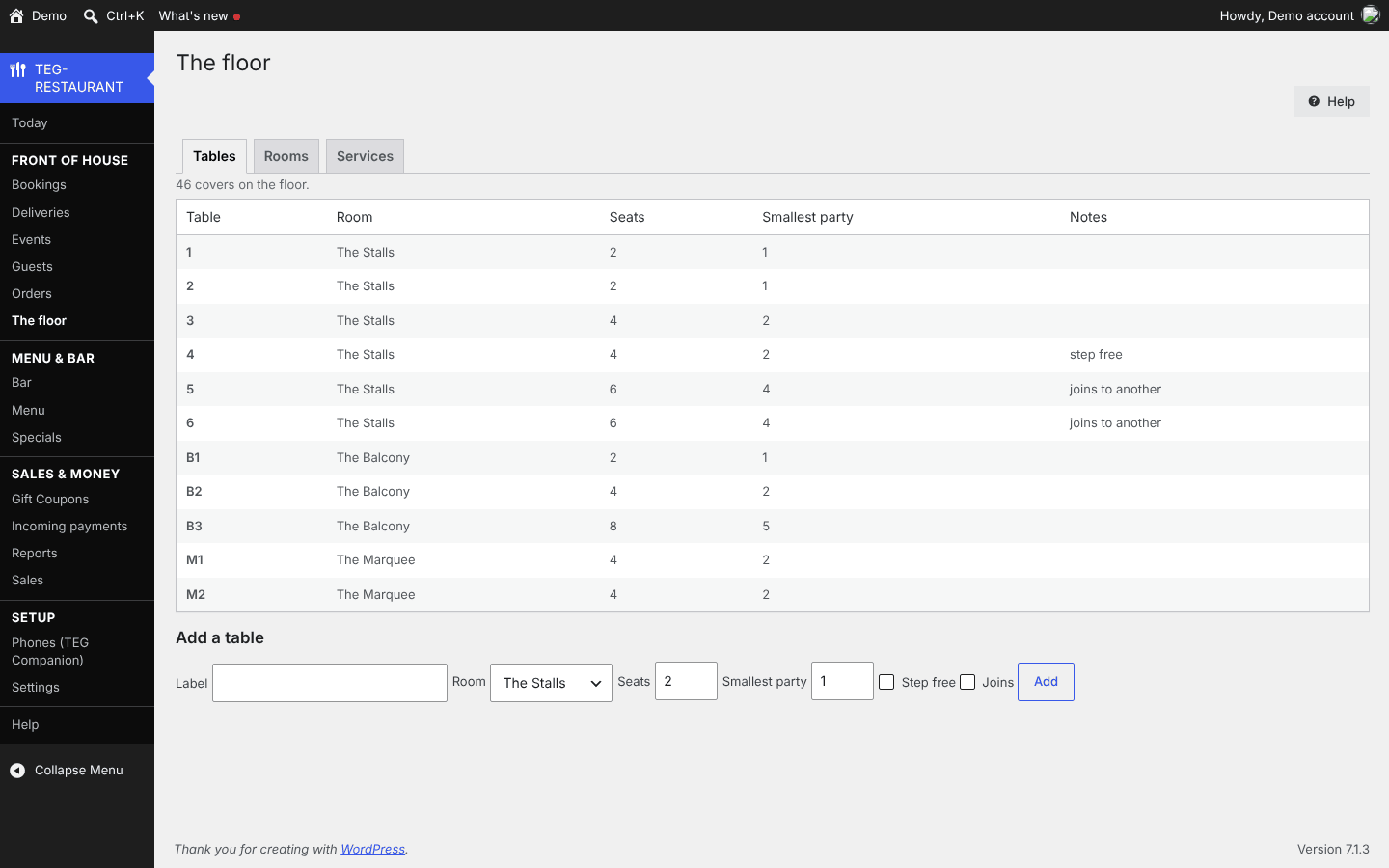
The floor
What would you save?
Filled in from the comparison sheet: Toast Point of Sale with card fees – $69/mo x 60 = $4,140 + about 2.49% + 15c = $13,950/yr x 5 = $69,750 (quoted per restaurant; the rate via merchantinsiders.com) + hardware and onboarding about $3,700 (via owner.com). Prices read on 12 November 2026; type your own bill to see yours. The sheet gives this figure as approximate.
| Years | What you pay now | TEG, yearly license | TEG, lifetime license | Difference |
|---|---|---|---|---|
| 1 year | $828 | $599 | $2,995 | you keep $229 |
| 3 years | $2,484 | $1,797 | $2,995 | you keep $687 |
| 5 years | $4,140 | $2,995 | $2,995 | you keep $1,145 |
TEG has no per-user fee: the license price is the same for one person or fifty. The lifetime license is paid once; the yearly one each year. Card processing, hardware and your hosting are left out on both sides.
What it does
- Availability that knows a table is held for a turn.
- A till for the floor and the bar.
- A dish that runs out is marked off until the end of tonight and comes back by itself in the morning; nobody has to remember to switch it on again.
The back office of a bar and restaurant: a menu with the fourteen named allergens declared on every dish and a plate cost built from the ingredients, so the margin is visible before anybody argues about the price; a bar that keeps what you sell, what is in the cellar and what is pouring as three different things, with keg levels in milliliters; rooms, tables and services; reservations that understand a table is held for a turn rather than a moment, with deposits, no-show fees and a waitlist if you want them; orders to collect, to deliver or from a QR code on the table, placed from the website and paid by card through your own Square account if you choose; kitchen tickets on a thermal printer; texts to the guests who asked for them; gift cards and loyalty points; events with seats that count themselves out; and specials written as rules that start and stop on their own.
Who it is for
Publicans, brewpubs and small restaurants paying a booking platform by the cover and an ordering platform by the order, on a website they already own and already pay for.
Why it beats what you are using now
- Availability that knows a table is held for a turn: a table booked at seven is not free at eight, which is the mistake that double-books a dining room.
- A till for the floor and the bar: tabs that stay open while the party orders, rounds fired to the kitchen by course, split checks, comps and voids approved with a manager PIN, and a cash drawer counted at close.
- A dish that runs out is marked off until the end of tonight and comes back by itself in the morning; nobody has to remember to switch it on again.
- Every order line keeps the name and the price as charged, so raising a price next week cannot rewrite what somebody paid last Friday.
- Dish options – size, sides, remove, extras – each carry their own price change, plate-cost change and the allergens choosing them adds, and the server checks every choice again: a required question left empty is refused, not guessed.
- An allergen filter guests can use: tick what you avoid and the dishes containing it are greyed out or hidden with the allergen named. A dish with no allergen data says "ask staff" and is never passed as safe.
- A special is a rule – half price openers, four until six, Tuesday to Friday – so it is true every week without anybody editing the menu, and stops on its end date without anybody remembering.
- Keg levels in whole milliliters, because pouring is subtraction and a float drifts a pint out over a busy weekend; the tap board says what is nearly gone.
- The trade data sits in its own tables in the database you already back up, with no commission on a booking and no commission on an order – card payments through Square go to your own Square account.
- Unlimited support by ticket at every price, in-person help if you want it, and a feature request that would help every shop gets built at no charge.
Manage it from your phone (TEG Companion)
TEG Companion is the staff app on your phone (iPhone or Android) or the counter PC (Windows) that works with your shop's own server – no cloud account in between. Every request runs as the person the phone is paired to, so it can do only what they may do on the website, and one phone can be paired with several TEG shops and switch between them. It is included with the shop license. Its reports go back up to twelve months, and in most shops a quote, invoice or order opened on the phone shows exactly the copy the customer gets. With the shop on the Pro edition, each phone can show the app in Spanish or French – on Android and Windows today, not on iPhone yet.
What it does with TEG Restaurant:
- Orders: take one, change it and move it through the kitchen and out of the door; guests; notes, photos and a signature at delivery.
- Payments taken and the day close. Allergies are always shown on an order and cannot be hidden; nothing is e-mailed or texted to a guest from the phone.
Try it on this demo: install TEG Companion, open Manage shops > Demo shops and choose TEG Restaurant. Your phone gets a demo sign-in of its own for this shop – no password to type – with the sample data on it, and the pairing ends by itself after seven days. Nothing you do there reaches a real person.
Opens TEG Companion in a new tab, already connected to this demo shop. Nothing to install. Sample data, rebuilt every night.
Scan to get the real app on your phone.
iPhone: on the App Store. The download page always carries the latest version for Android and Windows.
Download on theApp StoreDownload forAndroidDownload forWindows
In English, Spanish and French
Every TEG shop, and the TEG Companion app, run in English, Spanish and French. The language is a download inside the shop – Settings > Language, no reinstall – and the language packs need the Pro edition (the Language screen is there in every edition). Quotes, invoices, receipts, e-mails, texts and the customer pages follow the shop's language, whoever clicks the button, and each staff member can pick their own screen language. The phone apps: on Android and Windows now.
Need a language we do not list yet? Ask – we add it free for Pro and lifetime licenses.
Books, payroll and taxes: TEG Back Office, the Pro add-on – see it
New: a referral offer (off until you turn it on) – a guest's code takes the discount you choose off a new guest's first order, and the guest who sent them gets a reward once that order is paid in full: first order only, one per person, nobody referring themselves, at most 12 rewards a year unless you change it, and the offer line in e-mails only for guests who agreed to marketing. A card kept on file for a booking is let go when the booking is finished, and a discount larger than what is still owed is refused. New in 1.18-1.21: the till (switch it on under Settings) – tabs for tables and the bar, rounds held and fired to the kitchen by course, covers, comps and voids approved with a manager PIN, the bill split evenly or check by check, cash, card and the Square Terminal with tips kept apart, and a cash drawer with float, expected and counted; on Pro, each member of staff works in their own language and guests get e-mails, receipts, texts, the menu and the booking and pay pages in the restaurant's language, with Spanish and French packs; dates and money written your region's way; and TEG Companion reports going back up to 12 months, with an order on the phone showing exactly the guest's copy. New: dish options (size, sides, remove, extras) with their own price, plate cost and allergens, and an "I need to avoid" allergen filter on the menu; ordering at the table from a QR code on each table, and staff taking a pickup or a table's order on the same screen; card payment at checkout through your own Square account (Off, Optional or Required), with refunds back through Square; booking deposits and no-show fees through Square, the policy accepted before the guest confirms; guests moving their own booking to another date, time or party size; kitchen tickets printed through PrintNode, with a second printer behind the bar; texts to guests through your own Vonage account – confirmation, reminder, order ready, driver on the way, waitlist offers – only to guests who ticked "Text me", with STOP, quiet hours and a log; a waitlist that offers a freed table to the next party for 15 minutes; gift cards; and loyalty points or a stamp card. Every one of them is off until you switch it on. New: gift coupons and sales, Pay by Zelle with Zelle payments matched to the order from the bank's alert, a register of permits, licenses and equipment checks, nightly off-site backups, one-click setup and a Help Center inside the plugin.
Try it with your own data
Upload a CSV of your customers – an export from the program you use now (RepairShopr, RepairDesk, Jobber or a spreadsheet) – and see them inside the demo. Only you see them, and they are deleted after 24 hours.
What your customer sees
Your shop screen and your customer's page side by side, in a sandbox of your own: book as the customer, move the job on as the shop, text a pay link and pay it with a test card. Nothing is charged and nothing is sent.
How it compares
A US restaurant usually pays a till-and-payments platform (Toast or Square for Restaurants), a booking network (OpenTable) and a delivery marketplace (DoorDash); each publishes a subscription, and each makes its real money on a percentage or a per-cover fee that grows with trade.
At a glance
TEG Restaurant beside Toast, Square for Restaurants, OpenTable on the seven questions people ask first. Under every figure is where it comes from and when it was checked; "not published" means we did not find it on the vendor's own pages – it is not a No.
| Question | TEG Restaurant | Toast | Square for Restaurants | OpenTable |
|---|---|---|---|---|
| Monthly price (lowest public plan) | No monthly plan: $599 a year or $2,995 once | $69/mo per location (Point of Sale); $0 Starter Kit; plus processing and hardwaresource, 24 Sep 2026 | $0 / $49 / $149 per location a month, plus processingsource, 24 Sep 2026 | $149 / $299 / $499 a month, plus per-cover feessource, 24 Sep 2026 |
| Per-user fees | None: one license per site, unlimited users | Per location, not per user; more terminals = more hardwaresource, 24 Sep 2026 | Per location; KDS $20-30/mo and Kiosk $30-50/mo per devicesource, 24 Sep 2026 | Per cover: $1-$1.50 per network coversource, 24 Sep 2026 |
| Who holds your data | You: in your own WordPress database | Vendor (their cloud)source, 24 Sep 2026 | Vendor (their cloud)source, 24 Sep 2026 | Vendor (their cloud)source, 24 Sep 2026 |
| Works offline / self-hosted | Self-hosted on your WordPress; when your site is down, so is it | Yes: offline mode takes cards and stores them; not self-hostedsource, 24 Sep 2026 | Yes: offline payments on every plan; not self-hostedsource, 24 Sep 2026 | not publishedsource, 24 Sep 2026 |
| Phone app | TEG Companion staff app (iPhone on the App Store, Android, Windows), included | not publishedsource, 24 Sep 2026 | not publishedsource, 24 Sep 2026 | not publishedsource, 24 Sep 2026 |
| Card payments | Through your own Square account: online checkout, booking deposits and no-show fees; Send to Square Terminal from the bill; Take payment in TEG Companion (Tap to Pay or a Square Reader on Android); the till takes cash, card and the Square Terminal on a tab, with split checks and a cash drawer | Yes, plus a percentage of every card paymentsource, 24 Sep 2026 | Yes: 2.4-2.6% + 15c in personsource, 24 Sep 2026 | Deposits and prepaid Experiencessource, 24 Sep 2026 |
| Free trial | 30 days, built in, no sign-up | not publishedsource, 24 Sep 2026 | not publishedsource, 24 Sep 2026 | not publishedsource, 24 Sep 2026 |
Where a cell says "better than us", it is. Prices change: ask a vendor to confirm their figure before you decide anything on it.
The vendors' own published list prices, read on 12 November 2026. Ask a vendor to confirm their figure before you decide anything on it.
The rows where a competitor matches us, or does it better, are left in. A comparison written only to flatter the seller is worth nothing to the person buying.
What would it cost you?
Pick what you use now, or type what you pay. Every competitor price below is the one on their own pricing page, with the date we read it.
| 1 year | 3 years | |
|---|---|---|
| What you pay now | $828 | $2,484 |
| TEG Restaurant, paid yearly (founding offer: first year at half price) | $299.50 you save $528.50 | $1,497.50 you save $986.50 |
| TEG Restaurant, lifetime license | $2,995 TEG costs $2,167 more | $2,995 TEG costs $511 more |
- Toast: $69/mo per location (Point of Sale); $0 Starter Kit; plus processing and hardware – source, read 24 Sep 2026
- Square for Restaurants: $0 / $49 / $149 per location a month, plus processing – source, read 24 Sep 2026
- OpenTable: $149 / $299 / $499 a month, plus per-cover fees – source, read 24 Sep 2026
Our prices are our own published ones, per site, with no per-user fee. A competitor's first listed monthly price is used; their yearly discounts, add-ons and payment fees are not in it, and prices change – check their page.
Switching to TEG Restaurant
Switching from Toast, Square for Restaurants, OpenTable or DoorDash Marketplace? Pick the program you use now to see how your records come across.
From Toast
There is no ready column preset for Toast's export. The CSV import lets you match each column by hand and do test runs before anything is saved.
From Square for Restaurants
There is no ready column preset for Square for Restaurants's export. The CSV import lets you match each column by hand and do test runs before anything is saved.
Square for Restaurants in the five-year cost Ask The Eldest Geek
From OpenTable
There is no ready column preset for OpenTable's export. The CSV import lets you match each column by hand and do test runs before anything is saved.
From DoorDash Marketplace
There is no ready column preset for DoorDash Marketplace's export. The CSV import lets you match each column by hand and do test runs before anything is saved.
Rather have it done for you? If you keep your customers or your stock in a spreadsheet, we bring them in. Then we walk your staff through it. Moving your records over
Your next step
Which plan fits me?
Save my plan tick what you need, see the price, keep a copy
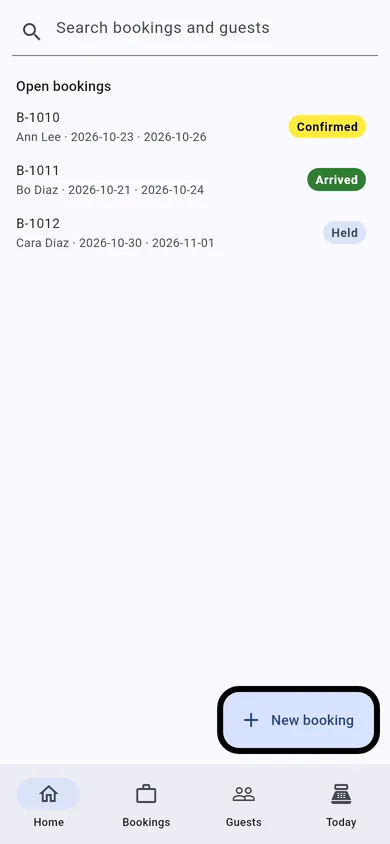
See it on the phone
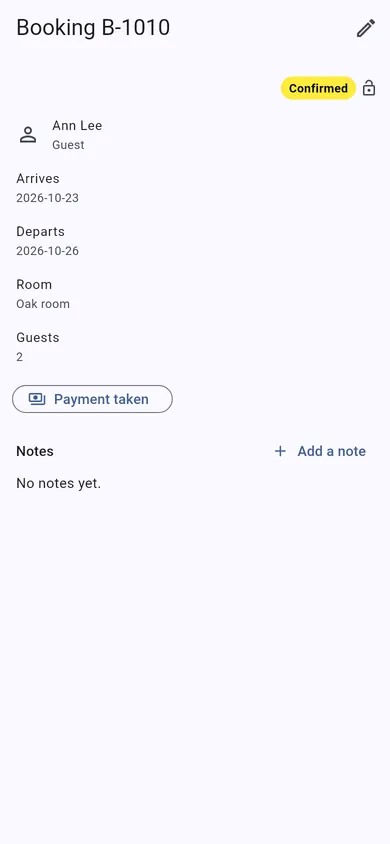
TEG Companion is the staff app that comes with the license. These are its real screens, not mock-ups.
These are TEG Companion's shared shop screens, shown with a sample booking. On your phone they show your own customers and work, in your trade's own words.
- No lock-in. It is a WordPress plugin on your own website. Your data stays in your own database, with you.
- Pay yearly or once. A lifetime license is $2,995, one time – or pay yearly if you prefer.
- Your data, out whenever you want. Backups to a private folder on your server that you can download and restore, on a schedule, with an off-site copy to Amazon S3, Wasabi, SFTP, FTP or Dropbox if you want one; CSV exports of your lists.
- Your data stays on your server – we cannot see it. The only call home is the license check, and it sends no customer, job or sale.
Built by people who run a shop: TEG RepairShop, the first of the family, is built and run in a real repair shop – TopTech Computers in Alexandria, Virginia.
Get the comparison sheet and setup checklist
The sheet sets this software beside what you pay for now, row by row; the checklist is every step from install to your first day on it. The links show here as soon as you press the button. Nothing here is needed to try the demo.
Questions
What does TEG Restaurant cost?
$599 a year or $2,995 once, one site. Pro $999 a year or $4,995 once. A free 30-day Pro trial is built in, with no sign-up. One site, no per-user fee, and support by ticket included.
Can I try it before I buy?
Yes, twice over: the live demo on this site, with sample data and no sign-up, and a free 30-day trial of the full Pro edition on your own website, with no card.
What happens when the trial ends?
Nothing is deleted and nothing is charged – there is no card on file. Without a license the shop pauses (you can still see your records, but not add to them) until you enter a license code; then you carry on with the same records.
Can I bring my records over?
Built in: Import from CSV takes the export of the system you use now (customers and, in most shops, their records too), matches the columns for you and checks every row before anything is saved. Anything it cannot read, we move for you.
How do I get my data out?
Backups to a private folder on your server that you can download and restore, on a schedule, with an off-site copy to Amazon S3, Wasabi, SFTP, FTP or Dropbox if you want one; CSV exports of your lists.
Is there a phone app?
TEG Companion, the staff app for an iPhone, an Android phone or the counter PC (Windows), comes with the license and talks only to your own site. The iPhone app is on the App Store.
Does it work in Spanish?
Yes, with the Pro edition: Spanish and French language packs download by themselves and put the shop's customer paperwork, e-mails, texts and customer pages in that language; each staff member picks their own screen language, and on Android and Windows the phone apps follow each phone's language. Without Pro everything stays in English.
Does it do the books, payroll and taxes?
Yes, with TEG Back Office, included with Pro: payroll, bills and expenses, the sales tax return, 1099s and your books in GnuCash, QuickBooks or Xero. Everything it does is on the TEG Back Office page. From this shop it reads everyone who works here – the back office, the floor and counter, the kitchen and the drivers (Settings > Access & staff) – in every edition; the hours and tips are typed in on the payroll run.
Where is my data kept?
In your own WordPress database, on your own hosting. Your data stays on your server – we cannot see it. There is no account with us that holds your customers, and no copy on our machines. (If you choose to have us host the site for you, it is on a server we look after, and we say so up front.)
Does the plugin send anything to you?
Only the license check and the list of language packs. For a paid license it asks our license server about once a day whether the license is still good, and it sends exactly this: which plugin and version, your site's domain name, a random install number made on your site, and your license code or a short fingerprint of it. It never sends a customer, a job, a sale or anything you typed. If our server cannot be reached the software keeps working. Twice a day the shop also reads the public list of language packs, and with Pro it downloads the packs it needs – that request carries no site address and nothing about your shop.
Who can see my records?
The people you give a WordPress account, with what you let them do. The phone apps talk only to your own site and do only what the person they are paired to may do there.
Open the live demoDownload & tryPrintable one-pager (PDF)Every trade