
TEG Wholesale
Software for a wholesale distributor with its own trucks
Run trade orders, picking, delivery and invoices from your own website.
$1,495/yr or $7,475 once. Pro, with TEG Back Office and the language packs: $1,695/yr or $8,475 once. A free 30-day Pro trial is built in.
Over 5 years: $7,475 vs QuickBooks + Zoho Inventory + OptimoRoute $26,724 How does it compare?
What's new – Help: the Help Center now has one Shortcodes section listing every shortcode this plugin adds.
Try it live Start free trial How does it compare? Save my plan Watch the full video (4 min)
See it in action
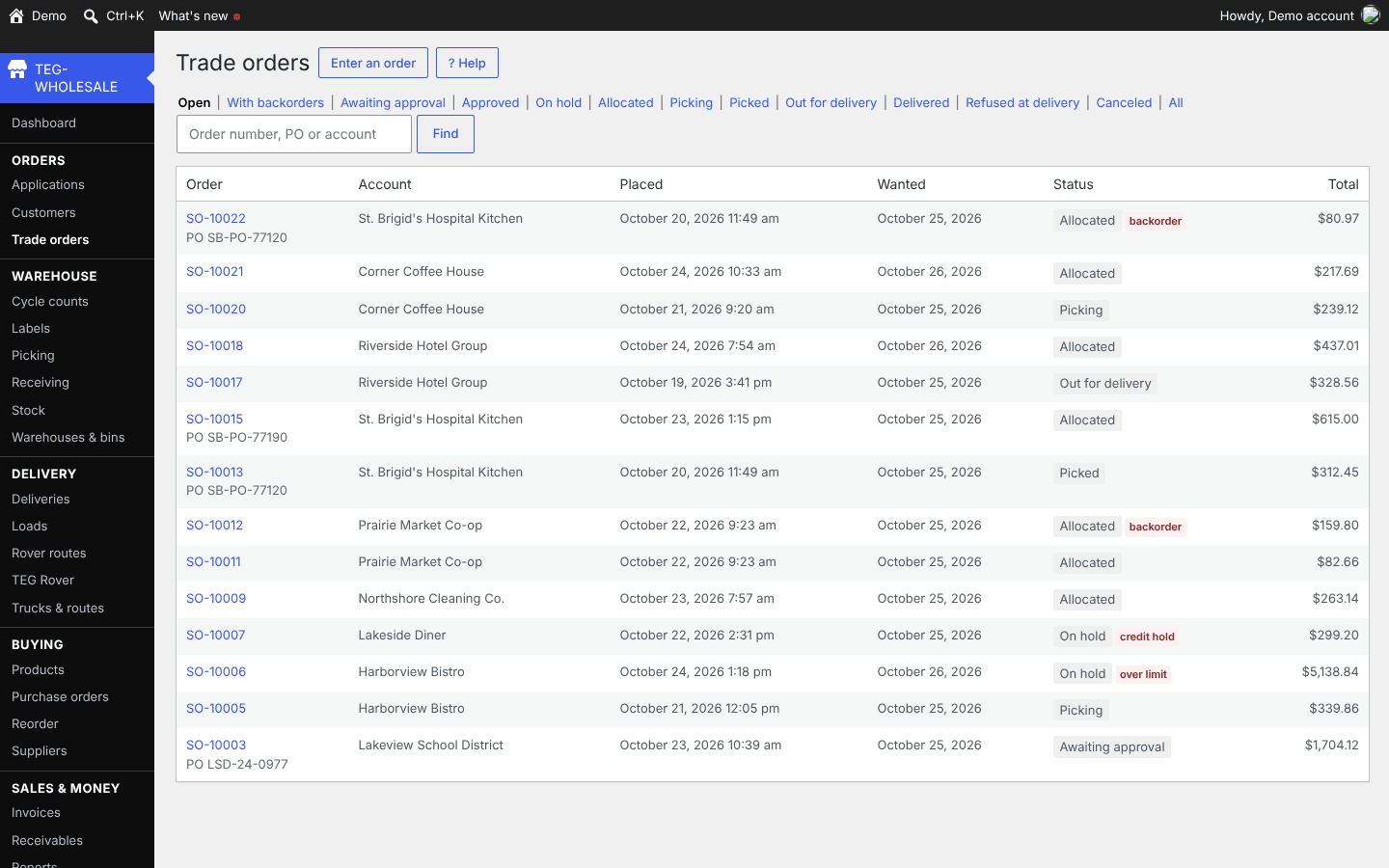
Trade orders 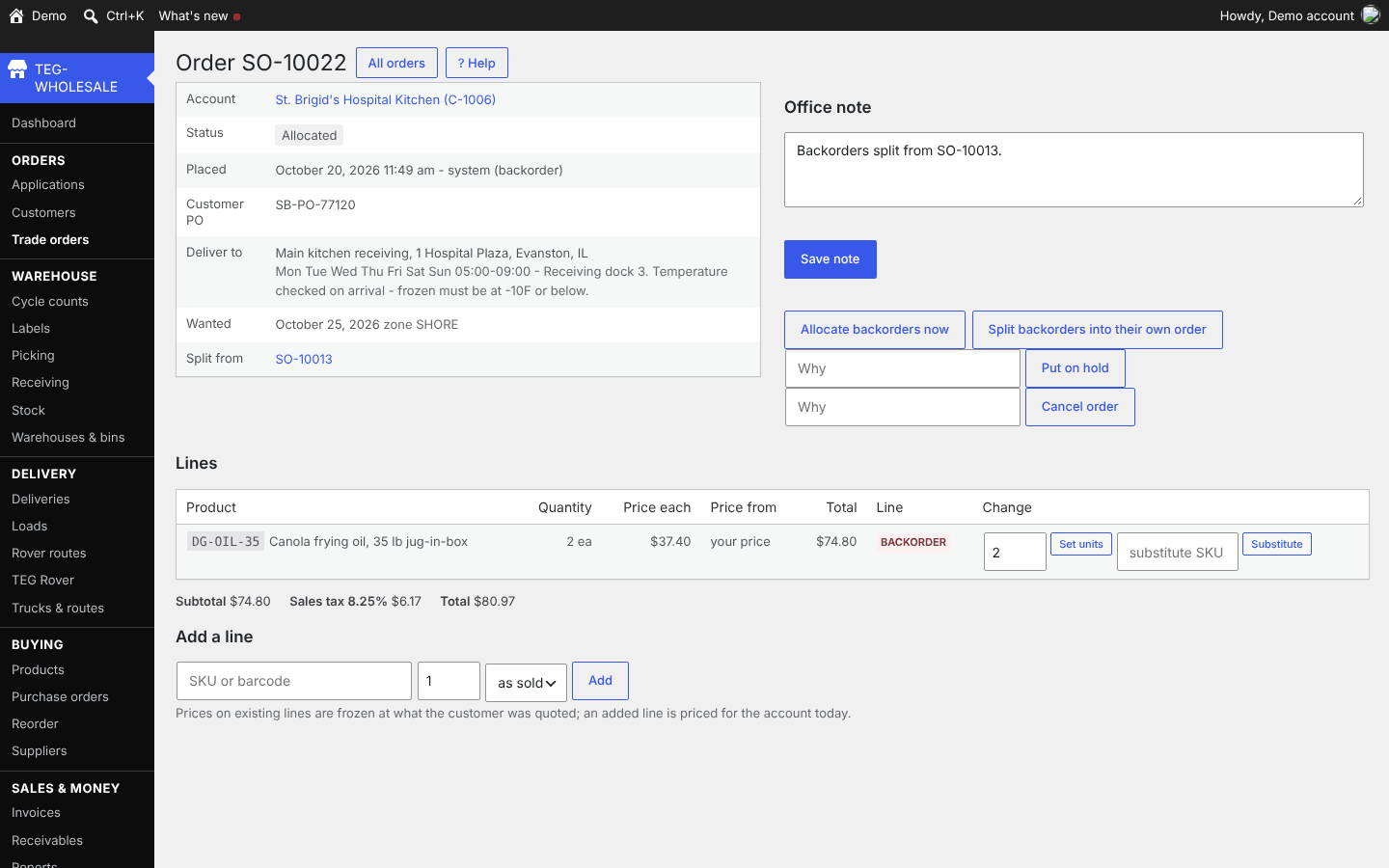
Order 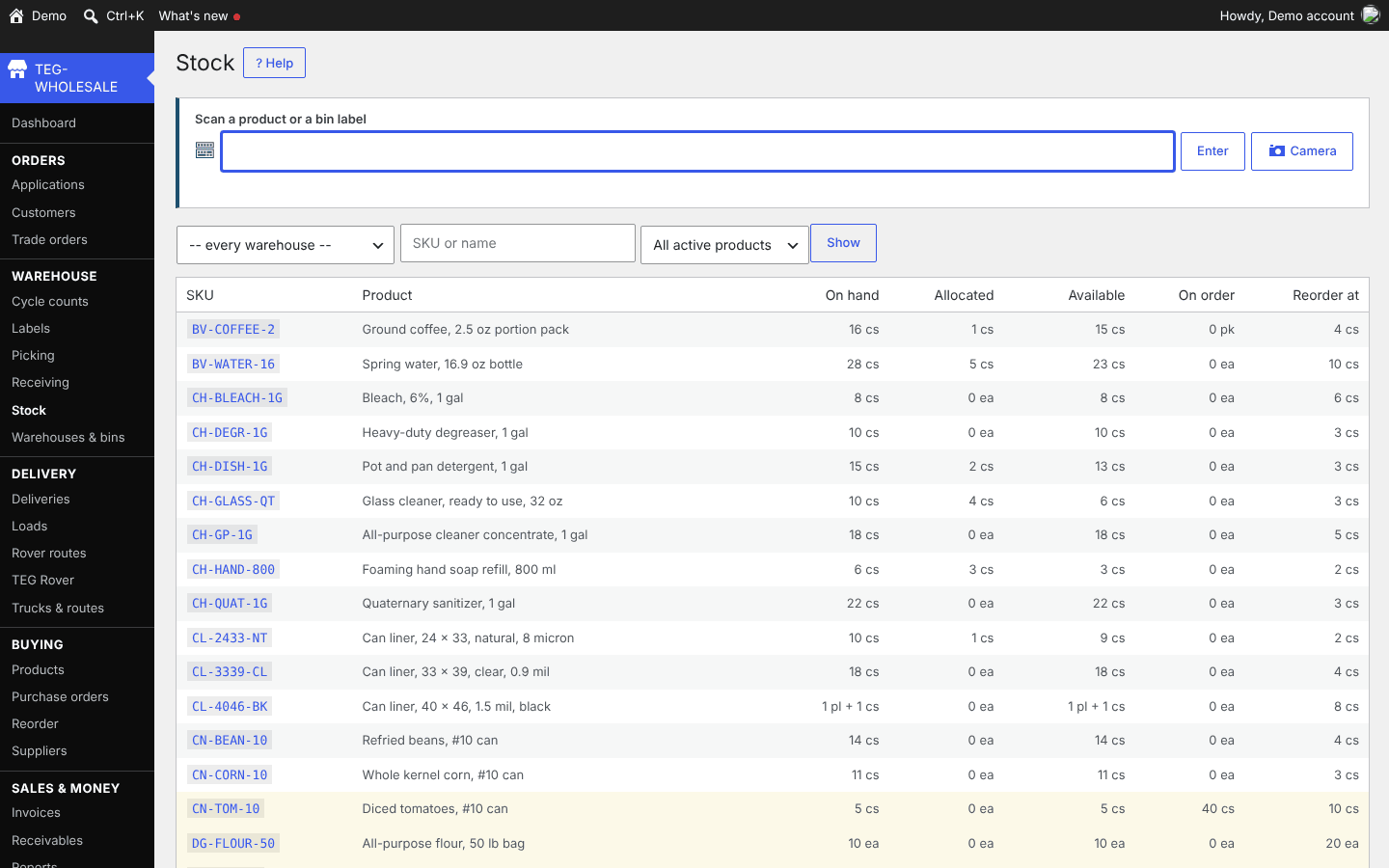
Stock
What would you save?
Filled in from the comparison sheet: QuickBooks + Zoho Inventory + OptimoRoute – $140 x 60 = $8,400 + $129 x 60 = $7,740 + $44.10 x 4 drivers x 60 = $10,584; still no site where customers place orders. Prices read on 12 November 2026; type your own bill to see yours.
| Years | What you pay now | TEG, yearly license | TEG, lifetime license | Difference |
|---|---|---|---|---|
| 1 year | $5,345 | $1,495 | $7,475 | you keep $3,850 |
| 3 years | $16,034 | $4,485 | $7,475 | you keep $11,549 |
| 5 years | $26,724 | $7,475 | $7,475 | you keep $19,249 |
TEG has no per-user fee: the license price is the same for one person or fifty. The lifetime license is paid once; the yearly one each year. Card processing, hardware and your hosting are left out on both sides.
What it does
- Scan a case and six units arrive, not one: a barcode belongs to a pack.
- Deliveries are checked against the order at the dock, while the driver is still there.
- Trade customers order online at their own prices.
The back office, trade storefront and delivery side of a wholesale distributor: a barcode for every pack, warehouses and bins, stock kept as a ledger, purchasing and receiving by scanning, trade accounts with their own prices and credit, a B2B ordering site, picking, trucks, routes and delivery slots, proof of delivery, invoices and receivables.
Who it is for
Distributors running their own trucks who stitch an inventory system, a routing app and QuickBooks together, or run the warehouse from a spreadsheet and a clipboard.
Why it beats what you are using now
- Every warehouse that has lost a day to "the system says forty and the shelf says twelve" lost it the same way: somebody could overwrite a quantity. Here stock moves ONLY through a ledger – received, adjusted, transferred, picked, returned, counted – with who, when and why, and nothing in it is ever edited or deleted. A ledger check proves at any moment that the figures agree.
- A BARCODE BELONGS TO A PACK, NOT A PRODUCT. The can has one code, the case of six another, the pallet a third. Scan the case and six units arrive, not one – software that ties one barcode to a product receives a pallet as one tin.
- RECEIVE AGAINST THE ORDER. Cartons are scanned at the dock against what was ordered, so over, short and damaged are found while the driver is still there, not a month later by accounts payable.
- Trade customers order online at THEIR prices – tier, contract and quantity breaks – by search, scan, spreadsheet or reorder, choosing a delivery day and slot their address can receive. Every page works the account out from the buyer who is logged in, never from a number in the address, and placing an order sets the stock aside at once.
- WHAT IS BILLED IS WHAT WAS DELIVERED. Picking by bin and barcode writes a short pick back as a count, trucks are loaded by scanning, the driver captures a signature and a photo, and the invoice is made from the quantities signed for at the prices frozen on the order.
Manage it from your phone (TEG Companion): the warehouse floor
TEG Companion is the staff app on your phone (iPhone or Android) or the counter PC (Windows) that works with your shop's own server – no cloud account in between. Every request runs as the person the phone is paired to, so it can do only what they may do on the website, and one phone can be paired with several TEG shops and switch between them. It is included with the shop license. Its reports go back up to twelve months, and in most shops a quote, invoice or order opened on the phone shows exactly the copy the customer gets. With the shop on the Pro edition, each phone can show the app in Spanish or French – on Android and Windows today, not on iPhone yet.
What it does with TEG Wholesale:
- Stock by bin: look a product up by search or scan, move it, adjust it, and count it – blind for anyone who may count but not post counts.
- Receiving at the dock against the purchase order, with damaged units called out; GS1-128 case labels decoded on the phone, offline too.
- Picking by bin and barcode, with a reason for every short pick; loading the truck by scan with the list of what is still missing, and dispatch – after which the load goes to the driver's TEG Rover as a route.
- The distributor workflow (each part behind its own switch): quick order entry for a customer's usual items, the truck pool and pick totals.
Try it on this demo: install TEG Companion, open Manage shops > Demo shops and choose TEG Wholesale. Your phone gets a demo sign-in of its own for this shop – no password to type – with the sample data on it, and the pairing ends by itself after seven days. Nothing you do there reaches a real person.
Opens TEG Companion in a new tab, already connected to this demo shop. Nothing to install. Sample data, rebuilt every night.
Scan to get the real app on your phone.
iPhone: on the App Store. The download page always carries the latest version for Android and Windows.
Download on theApp StoreDownload forAndroidDownload forWindows
TEG Rover: the delivery driver phone app Add-on
For drivers on the distributor's delivery routes, beside the driver's screen that already runs in the phone browser. In use now: on iPhone from the App Store, and on Android (Android 7 or newer) downloaded straight to the phone, paired with the shop by a QR code. The Android download page always carries the latest version. A paid add-on: one phone is included with Pro and each extra phone is $99 a year; with Standard, $99 a year per phone. Until the add-on license is on sale it runs on the shop's own license.
Download on theApp StoreDownload forAndroid
- A dispatched load becomes its driver's route by itself: any number of stops, in the order the office set – the app never re-plans it.
- The whole route is on the phone before the truck leaves, so a dead zone never stops a delivery: the next stop, what to hand over and any cash on delivery, with Navigate handing off to Waze, Google Maps or Apple Maps.
- Proof of delivery at every stop, line by line: the delivered count with a reason when short, the name, a signature, photos and the money collected on a COD account. Refused and damaged units go back to the receiving dock, and the invoice is made from what was delivered – the same record as from the browser.
- Each stop's proof waits on the phone in its own queue and is sent when the signal returns, never twice; the driver moves on to the next stop at once.
- The office can change the order of the stops still to do mid-route; the stops already delivered stay put, and every version of the route is kept. The live map shows the stops and where each driver last checked in, on shift only.
- Money is taken at the door only on COD accounts; everyone else is invoiced from what was delivered. The driver's screen in the phone browser keeps working beside the app.
Delivery and routing apps have GPS and proof of delivery too. The difference: one flat yearly price per phone rather than a monthly fee per driver, the data stays on your own site, each phone pairs by scanning a QR code with its own key you can revoke – no passwords – and location is shared only on shift.
In English, Spanish and French
Every TEG shop, and the TEG Companion and TEG Rover apps, run in English, Spanish and French. The language is a download inside the shop – Settings > Language, no reinstall – and the language packs need the Pro edition (the Language screen is there in every edition). Quotes, invoices, receipts, e-mails, texts and the customer pages follow the shop's language, whoever clicks the button, and each staff member can pick their own screen language. The phone apps: on Android and Windows now.
Need a language we do not list yet? Ask – we add it free for Pro and lifetime licenses.
Books, payroll and taxes: TEG Back Office, the Pro add-on – see it
New: the TEG Help Center – the full manual with a searchable FAQ, and a "?" on every screen that opens the help for that screen; "Get support" at the top of every screen to report a problem or ask for a feature; backups by hand or every night, copied off-site if you choose (SFTP, FTP, Amazon S3 / Wasabi or Dropbox), restored behind a typed RESTORE after a safety backup; a one-click setup page with sample data that Finish removes again; and "What's new" listing every release since the one you last read. New in 1.18-1.19: invoices, statements, credit notes, order e-mails, delivery proof copies, the trade ordering site and purchase orders in the shop's own language, with each staff member's own screen language (Spanish and French packs, on the Pro license); delivery days, windows and route times written your region's way, in TEG Rover too; and a sample distributor with three months of steady trade to try. Since 1.8: quick order entry, a dispatch board, catch weight from the GS1 label and truck stock sold at the door. Receivables are the sum of invoices less payments – never a balance somebody types in – and the credit check at checkout uses that figure. New: phones for the warehouse and the trucks. TEG Rover takes a dispatched load to the driver as a route of stops, with proof of delivery at every stop, and the office can reorder the stops still to do; TEG Companion is the warehouse floor – bins and blind counts, receiving against the purchase order, picking with short-pick reasons, scan-to-load with a missing list, and dispatch. One key per phone, for either app or both. Also recently added: a "What's new" card after each update, backups that restore again, and a license that pauses the office without ever stopping a driver's proof of delivery, a print or an order already on its way.
Try it with your own data
Upload a CSV of your customers – an export from the program you use now (RepairShopr, RepairDesk, Jobber or a spreadsheet) – and see them inside the demo. Only you see them, and they are deleted after 24 hours.
What your customer sees
Your shop screen and your customer's page side by side, in a sandbox of your own: book as the customer, move the job on as the shop, text a pay link and pay it with a test card. Nothing is charged and nothing is sent.
How it compares
A distributor that runs its own trucks usually stitches two or three systems together: an inventory system (Zoho Inventory, Cin7 Core), a routing and proof-of-delivery app (OptimoRoute), and QuickBooks for the books – or buys one food-service platform (BlueCart) on a quote. The columns are those pieces, named, with their published prices where they publish one.
At a glance
TEG Wholesale beside Zoho Inventory, Cin7 Core, BlueCart on the seven questions people ask first. Under every figure is where it comes from and when it was checked; "not published" means we did not find it on the vendor's own pages – it is not a No.
| Question | TEG Wholesale | Zoho Inventory | Cin7 Core | BlueCart |
|---|---|---|---|---|
| Monthly price (lowest public plan) | No monthly plan: $1,495 a year or $7,475 once | Plus: $129/mo billed yearly ($159 monthly), 10 users (our sheet priced Plus)source, 12 Nov 2026 | Pro: $599/mo, 10 users (our sheet priced Pro)source, 12 Nov 2026 | Quote onlysource, 12 Nov 2026 |
| Per-user fees | None: one license per site, unlimited users | +$7.50 per user a month beyond 10source, 12 Nov 2026 | More than 10 users: quotedsource, 12 Nov 2026 | not publishedsource, 24 Sep 2026 |
| Who holds your data | You: in your own WordPress database | Vendor (Zoho cloud)source, 24 Sep 2026 | Vendor (Cin7 cloud)source, 24 Sep 2026 | Vendor (their cloud)source, 24 Sep 2026 |
| Works offline / self-hosted | Self-hosted on your WordPress; when your site is down, so is it | not publishedsource, 24 Sep 2026 | not publishedsource, 24 Sep 2026 | not publishedsource, 24 Sep 2026 |
| Phone app | TEG Companion staff app (iPhone on the App Store, Android, Windows), included | Yes: iOS and Androidsource, 24 Sep 2026 | Yes: Core WMS on iOS and Androidsource, 24 Sep 2026 | Yes: iOS and Android, driver appsource, 24 Sep 2026 |
| Card payments | One invoice or the whole statement balance online through your own Square, Stripe or PayPal; Square Terminal at the office; refunds through the gateway; pay on the phone in TEG Companion on an invoice or the statement, and drivers take payment at the door. Account credit is used first | Online gateways plus recorded offline paymentssource, 24 Sep 2026 | not publishedsource, 24 Sep 2026 | BlueCart Pay (ACH)source, 12 Oct 2026 |
| Free trial | 30 days, built in, no sign-up | not publishedsource, 24 Sep 2026 | not publishedsource, 24 Sep 2026 | not publishedsource, 24 Sep 2026 |
Where a cell says "better than us", it is. Prices change: ask a vendor to confirm their figure before you decide anything on it.
The vendors' own published list prices, read on 12 November 2026. Ask a vendor to confirm their figure before you decide anything on it.
The rows where a competitor matches us, or does it better, are left in. A comparison written only to flatter the seller is worth nothing to the person buying.
What would it cost you?
Pick what you use now, or type what you pay. Every competitor price below is the one on their own pricing page, with the date we read it.
| 1 year | 3 years | |
|---|---|---|
| What you pay now | $1,548 | $4,644 |
| TEG Wholesale, paid yearly (founding offer: first year at half price) | $747.50 you save $800.50 | $3,737.50 you save $906.50 |
| TEG Wholesale, lifetime license | $7,475 TEG costs $5,927 more | $7,475 TEG costs $2,831 more |
- Zoho Inventory: Plus: $129/mo billed yearly ($159 monthly), 10 users – source, read 12 Nov 2026
- Cin7 Core: Pro: $599/mo, 10 users – source, read 12 Nov 2026
- BlueCart: Quote only – source, read 12 Nov 2026
Our prices are our own published ones, per site, with no per-user fee. A competitor's first listed monthly price is used; their yearly discounts, add-ons and payment fees are not in it, and prices change – check their page.
Switching to TEG Wholesale
Switching from Zoho Inventory, Cin7 Core, BlueCart or OptimoRoute? Pick the program you use now to see how your records come across.
From Zoho Inventory
There is no ready column preset for Zoho Inventory's export. The CSV import lets you match each column by hand and do test runs before anything is saved.
From Cin7 Core
There is no ready column preset for Cin7 Core's export. The CSV import lets you match each column by hand and do test runs before anything is saved.
From BlueCart
There is no ready column preset for BlueCart's export. The CSV import lets you match each column by hand and do test runs before anything is saved.
From OptimoRoute
There is no ready column preset for OptimoRoute's export. The CSV import lets you match each column by hand and do test runs before anything is saved.
Rather have it done for you? If you keep your customers or your stock in a spreadsheet, we bring them in. Then we walk your staff through it. Moving your records over
Your next step
Which plan fits me?
Save my plan tick what you need, see the price, keep a copy
See it on the phone
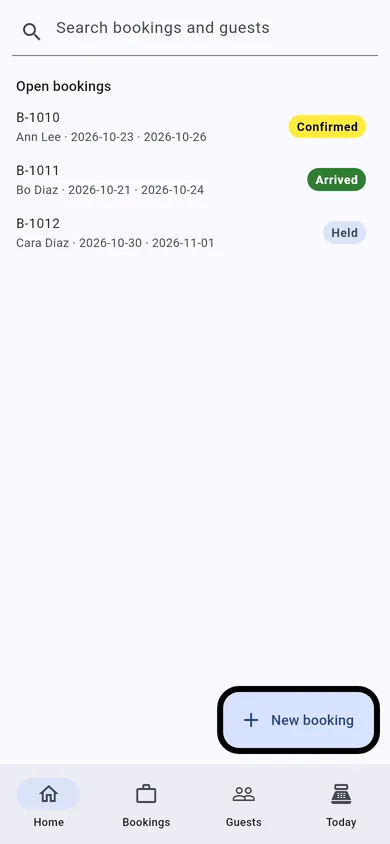
TEG Companion is the staff app that comes with the license. These are its real screens, not mock-ups.
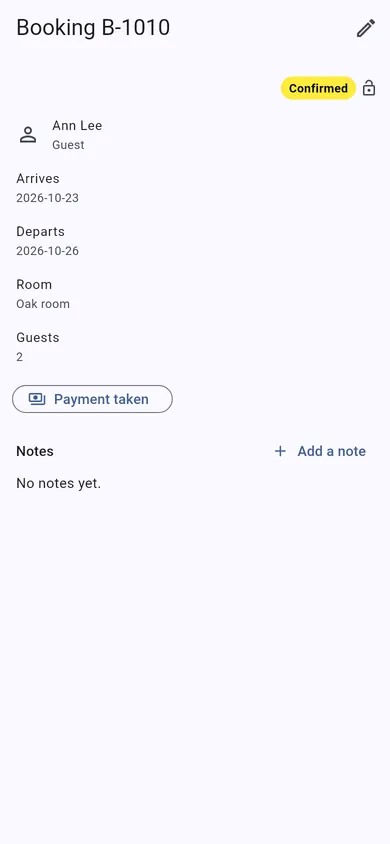
These are TEG Companion's shared shop screens, shown with a sample booking. On your phone they show your own customers and work, in your trade's own words.
- No lock-in. It is a WordPress plugin on your own website. Your data stays in your own database, with you.
- Pay yearly or once. A lifetime license is $7,475, one time – or pay yearly if you prefer.
- Your data, out whenever you want. Backups of everything the shop holds, kept in a private folder on your server, that you can download and restore; CSV exports of your lists and reports.
- Your data stays on your server – we cannot see it. The only call home is the license check, and it sends no customer, job or sale.
Built by people who run a shop: TEG RepairShop, the first of the family, is built and run in a real repair shop – TopTech Computers in Alexandria, Virginia.
Get the comparison sheet and setup checklist
The sheet sets this software beside what you pay for now, row by row; the checklist is every step from install to your first day on it. The links show here as soon as you press the button. Nothing here is needed to try the demo.
Questions
What does TEG Wholesale cost?
$1,495/yr or $7,475 once. Pro, with TEG Back Office and the language packs: $1,695/yr or $8,475 once. A free 30-day Pro trial is built in. One site, no per-user fee, and support by ticket included.
Can I try it before I buy?
Yes, twice over: the live demo on this site, with sample data and no sign-up, and a free 30-day trial of the full Pro edition on your own website, with no card.
What happens when the trial ends?
Nothing is deleted and nothing is charged – there is no card on file. Without a license the shop pauses (you can still see your records, but not add to them) until you enter a license code; then you carry on with the same records.
Can I bring my records over?
Built in: Import / export takes your product list as a CSV file and checks every row before anything is changed.
How do I get my data out?
Backups of everything the shop holds, kept in a private folder on your server, that you can download and restore; CSV exports of your lists and reports.
Is there a phone app?
TEG Companion, the staff app for an iPhone, an Android phone or the counter PC (Windows), comes with the license and talks only to your own site. The iPhone app is on the App Store. TEG Rover, the app for work away from the shop, works with this shop too, on iPhone from the App Store and on Android. One phone is included with Pro; each extra phone is $99 a year. With Standard, $99 a year per phone.
Does it work in Spanish?
Yes, with the Pro edition: Spanish and French language packs download by themselves and put the shop's customer paperwork, e-mails, texts and customer pages in that language; each staff member picks their own screen language, and on Android and Windows the phone apps follow each phone's language. Without Pro everything stays in English.
Does it do the books, payroll and taxes?
Yes, with TEG Back Office, included with Pro: payroll, bills and expenses, the sales tax return, 1099s and your books in GnuCash, QuickBooks or Xero. Everything it does is on the TEG Back Office page. From this shop it reads the staff – the warehouse roles (manager, purchasing, receiving, stock, sales desk, picker / loader, driver, accounts), then anyone else allowed into the back office, then the administrators, each once, trade buyers never; the hours are typed in on the payroll run.
Where is my data kept?
In your own WordPress database, on your own hosting. Your data stays on your server – we cannot see it. There is no account with us that holds your customers, and no copy on our machines. (If you choose to have us host the site for you, it is on a server we look after, and we say so up front.)
Does the plugin send anything to you?
Only the license check and the list of language packs. For a paid license it asks our license server about once a day whether the license is still good, and it sends exactly this: which plugin and version, your site's domain name, a random install number made on your site, and your license code or a short fingerprint of it. It never sends a customer, a job, a sale or anything you typed. If our server cannot be reached the software keeps working. Twice a day the shop also reads the public list of language packs, and with Pro it downloads the packs it needs – that request carries no site address and nothing about your shop.
Who can see my records?
The people you give a WordPress account, with what you let them do. The phone apps talk only to your own site and do only what the person they are paired to may do there.
Open the live demoDownload & tryPrintable one-pager (PDF)Every trade